

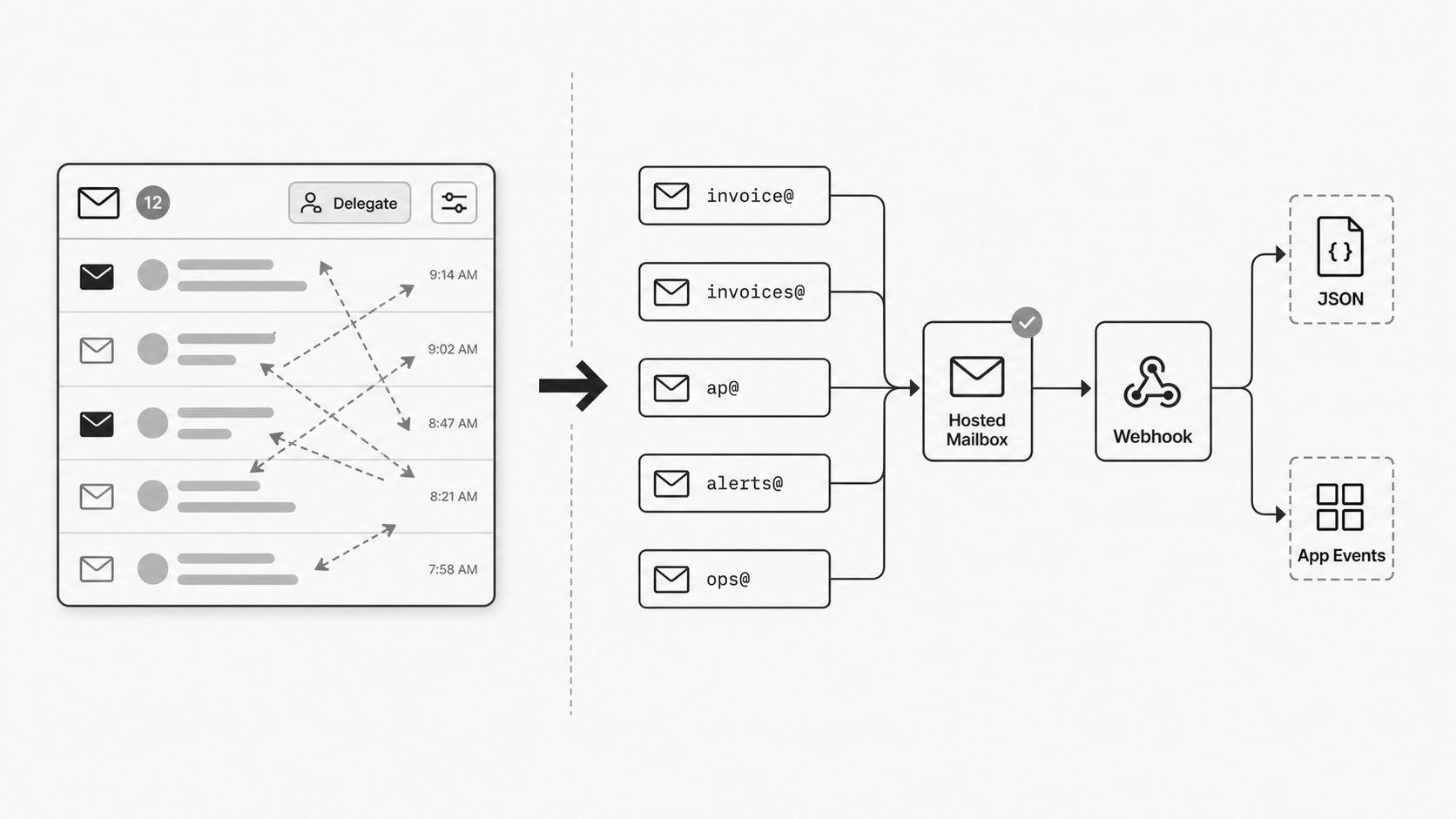
If you haven’t chosen your inbound source yet, Hosted Mailbox vs IMAP for Email Integration covers that decision first. For the broader architecture behind this sequence, The Case for an Email Ingestion Layer explains why inbound mail needs a governed layer before downstream applications use it.
Email still powers a surprising amount of operational work. Orders arrive by email. Vendor documents arrive by email. Alerts, approvals, tickets, and exception cases often enter the business through an address long before they touch an application. That is why intake design deserves more attention than it usually gets. For ops and platform leaders, a dedicated email intake address for automation is not just a convenience layer. It is part of the system boundary.
I think many teams are at an inflection point here. They are ready to stop repurposing a person’s inbox as a catchall for workflow-triggering messages and start creating dedicated channels that are actually designed for intake. That shift sounds small, but it changes ownership, reliability, governance, and the team’s ability to turn inbound email into clean downstream events.
In this post, I go deeper on the strategic value of hosted mailboxes for operational intake. I focus on four ideas that matter in practice: starting with an address built specifically for intake, using aliases to absorb real-world sender variation without creating sprawl, separating machine-handled inbound work from everyday employee email, and building governance directly into the intake point. Together, these choices create a cleaner front door for operations and a much better foundation for automation.
Why I start with an address built for intake
A hosted intake address should have one job: receive operational email and turn it into automation-ready output. People should not need to read it as a daily inbox. Client software should not connect to it as the system of record. The receiving path should not depend on a personal or shared mailbox credential, OAuth grant, delegate setting, or provider access policy.
That is the real advantage of a purpose-built intake address. The platform owns the address and the rules around it: which recipients are accepted, which aliases map to the same source, which messages are held for review, and which payload is delivered downstream. The output is designed for machine processing from the beginning, whether the next step is an event, a normalized record, or a webhook payload.
Microsoft’s shared mailbox documentation is still useful context because it shows that team-facing addresses such as support or company information have a different operating model from personal mailboxes. It also shows how ordinary mailbox limits, such as the 50 GB limit for an unlicensed shared mailbox, can become workflow limits when teams push intake through collaboration tools. (Microsoft Learn - About shared mailboxes in Microsoft 365)
Use an address whose only job is machine intake, then manage it like infrastructure. That gives the team a cleaner front door, clearer ownership, and a stable place to attach policy before any parser, route, or webhook runs. The address exists to receive, decide, and hand off. Human review can still happen around exceptions. The normal path is automation.
How to absorb messy sender behavior without making the system messy
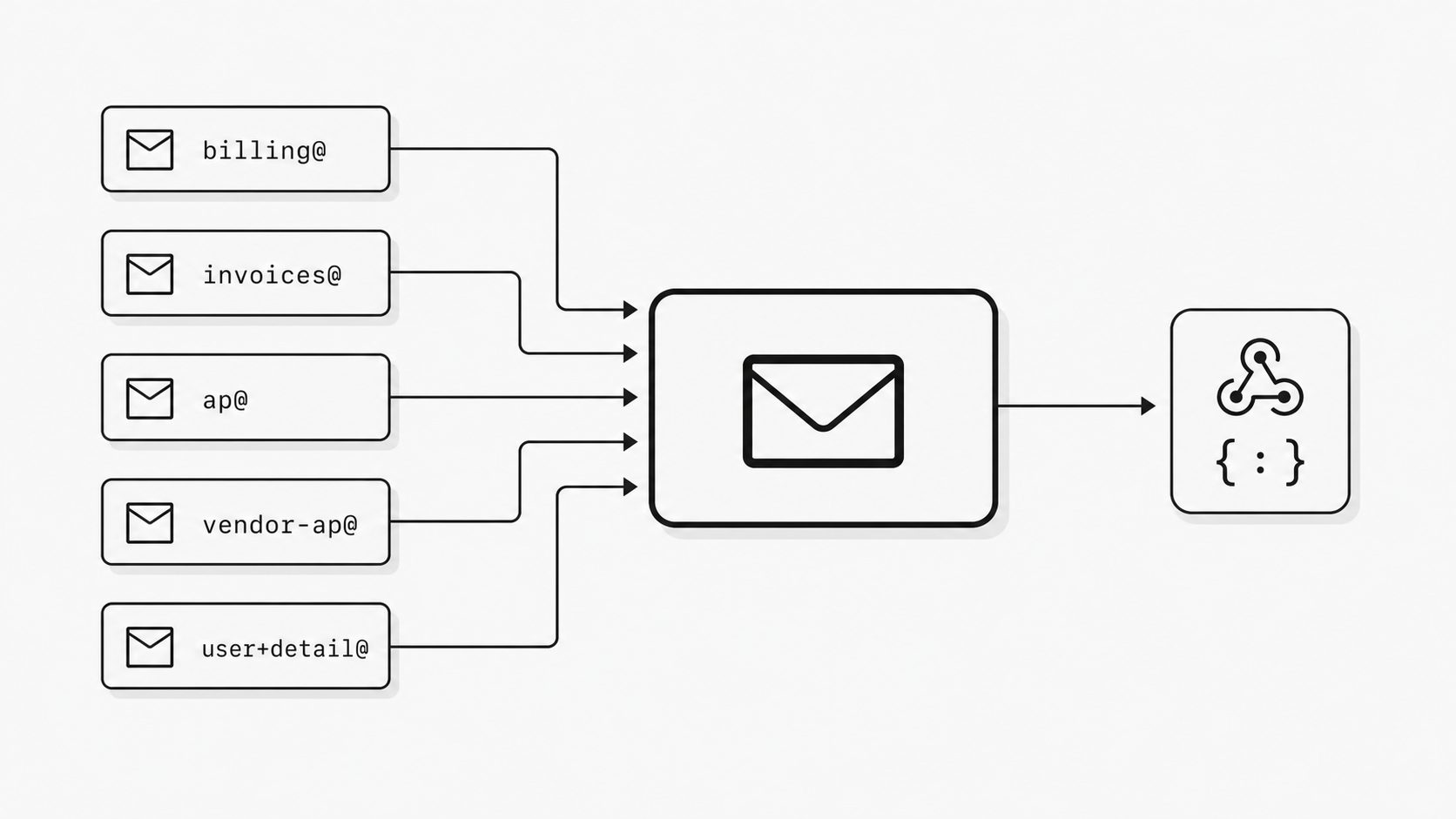
I have seen teams do the hard part first. They build a clean intake flow, wire it to automation, and set ownership. Then the real world shows up. One sender uses billing@. Another uses invoices@. A partner keeps mailing ap@. Someone copies the address from an old PDF and sends to a retired pattern. If I force every sender to behave perfectly, intake coverage drops. If I create a new mailbox for every variation, the operating model starts to sprawl. That is why I like alias-driven intake design. I can present many familiar entry points to the outside world while still landing everything in one managed source. (Google Workspace Admin Help - Add or delete an alternate email address)
Key term: Alias-driven intake design means using multiple inbound address variants to catch how senders actually email, while routing them into one controlled mailbox or processing source.
Here is the practical shift I want ops leaders to make. Treat sender variation as normal input behavior, not as a naming failure. Large platforms already support this pattern at meaningful scale. Google Workspace says an admin can add up to 30 email aliases for each user at no extra cost, and Microsoft 365 says a user can have up to 400 aliases with no additional fees or licenses. That does not mean every intake endpoint should accumulate dozens of public names. It does show that aliasing is a standard enterprise control surface, not a workaround. (Microsoft Learn - Add another email alias for a user)
So what does this look like in practice? I keep one managed intake source, then attach a small set of purpose-based aliases that reflect how outside parties are likely to address the workflow. For accounts payable, I might absorb invoice@, invoices@, ap@, and a vendor-specific pattern if history shows it matters. For a hosted email address API, the value is similar. I can keep one backend integration point while exposing addresses that fit different onboarding paths, partner conventions, or test scenarios without multiplying mailbox administration.
You might be wondering: does this only work with full aliases? No. Some systems also support subaddress-style patterns. RFC 5233 defines subaddressing for email filtering and describes formats such as user+detail@example.org, where the detail portion can be used for routing or comparison in compatible mail systems. I see that as another useful absorber of sender behavior, especially when teams want lightweight categorization or controlled testing. The standard also notes that implementations need to match the encoding method allowed by the surrounding mail system, which is an important reminder that plus-style designs depend on platform behavior. (IETF Datatracker - RFC 5233 Sieve Email Filtering: Subaddress Extension)
The design discipline is simple: aliases should widen capture, not widen ownership. One intake source. One monitoring surface. One policy boundary. One place to attach downstream email routing rules API logic if you need sender-domain routing, filtering, or workflow branching later.
The strategic win is coverage without clutter. Alias-driven intake design lets me meet senders where they are while keeping the internal model tight and governable. Instead of training the outside world into one perfect address pattern, I absorb variation at the edge and preserve order at the center. That gives ops teams fewer mailboxes to secure, fewer places to audit, and a cleaner path from inbound email to automation.
Why teams should stop blending human work and machine work
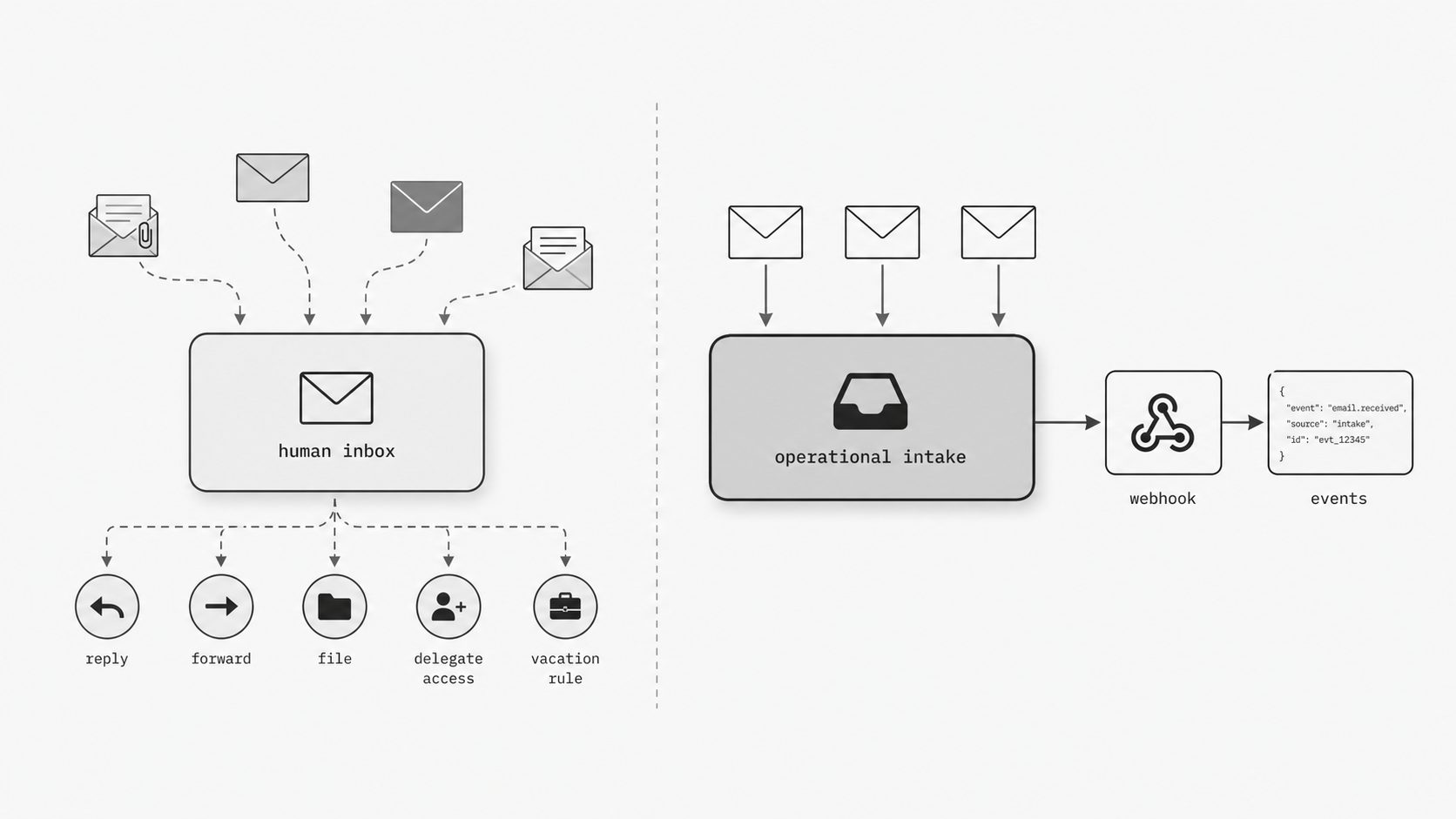
I see this mistake all the time: a team keeps operational intake inside someone’s regular mailbox because it feels fast and familiar. Then the mailbox starts doing two jobs at once. It has to support normal human conversation and act as a system entry point for workflow-triggering messages. That mix creates confusion about who owns the address, who can safely change settings, and what happens when the person behind the mailbox changes roles. Microsoft describes shared mailboxes as addresses multiple people can access and send from, which reflects a mailbox model for team-operated communication rather than one person’s daily inbox. Google also draws a sharp product boundary around aliases by noting that an alias is not a Google Account and does not support delegates. In other words, teams often treat inboxes, aliases, and operational addresses as interchangeable long after the platform has shown they are not. (Microsoft Learn - About shared mailboxes in Microsoft 365)
Key term: General-inbox separation means keeping operational email intake out of normal employee mailboxes so machine-handled work has its own controlled path.
Here is why I care so much about this. A human inbox is shaped around habits: reading, replying, filing, forwarding, and personal preferences. An operational intake point is shaped around consistency: capture, policy, routing, auditability, and downstream handling. When those two models share the same mailbox, small mailbox decisions can quietly become production decisions. A user changes a rule. A delegate changes. A vacation setting gets added. A client-side move breaks visibility. None of those actions look dramatic in the moment, but they can change how inbound work is seen and acted on. (Google Workspace Admin Help - Delegate a user’s email address)
You might be wondering: can I just send aliases into one employee inbox and call that good enough? I would be careful. Google’s admin documentation states that aliases do not support delegates because an alias is not a Google Account, and Gmail Help separately states that delegates cannot be added to an alternate email address or alias. That matters because an alias can widen address coverage, but it does not create a separate operational identity with its own collaboration model. If your intake path still lands inside a person’s general mailbox, the account-level constraints and risks still live there. (Gmail Help - Delegate and collaborate on email)
This is also where modern intake design gets more strategic. If the end goal is to forward email to webhook flows, trigger internal processing, or replace brittle IMAP to webhook patterns, the front door should be stable before the downstream automation is clever. Teams get cleaner operations when they separate the intake surface first, then connect that surface to rules, parsing, and event delivery. The mailbox becomes an operational asset with clear ownership instead of a side effect of one employee’s account.
So what does this actually look like in practice? Keep the human inbox for human work. Keep the intake address for inbound operational work. People can still review, supervise, or exception-handle the flow, but they do that around a managed team address or hosted intake surface rather than through one person’s everyday mailbox.
The real payoff is operational clarity. When general email use is separated from system-facing intake, ownership gets clearer, access decisions get cleaner, and automation has a more stable place to attach. That does not just reduce inbox mess. It reduces ambiguity in the operating model. The team knows which address is for conversation, which address is for intake, and which controls belong at each layer. For ops and platform leaders, that is the shift that matters most: stop treating operational email as a behavior inside someone’s mailbox and start treating it as a governed entry point in its own right.
What trust looks like at the intake point itself
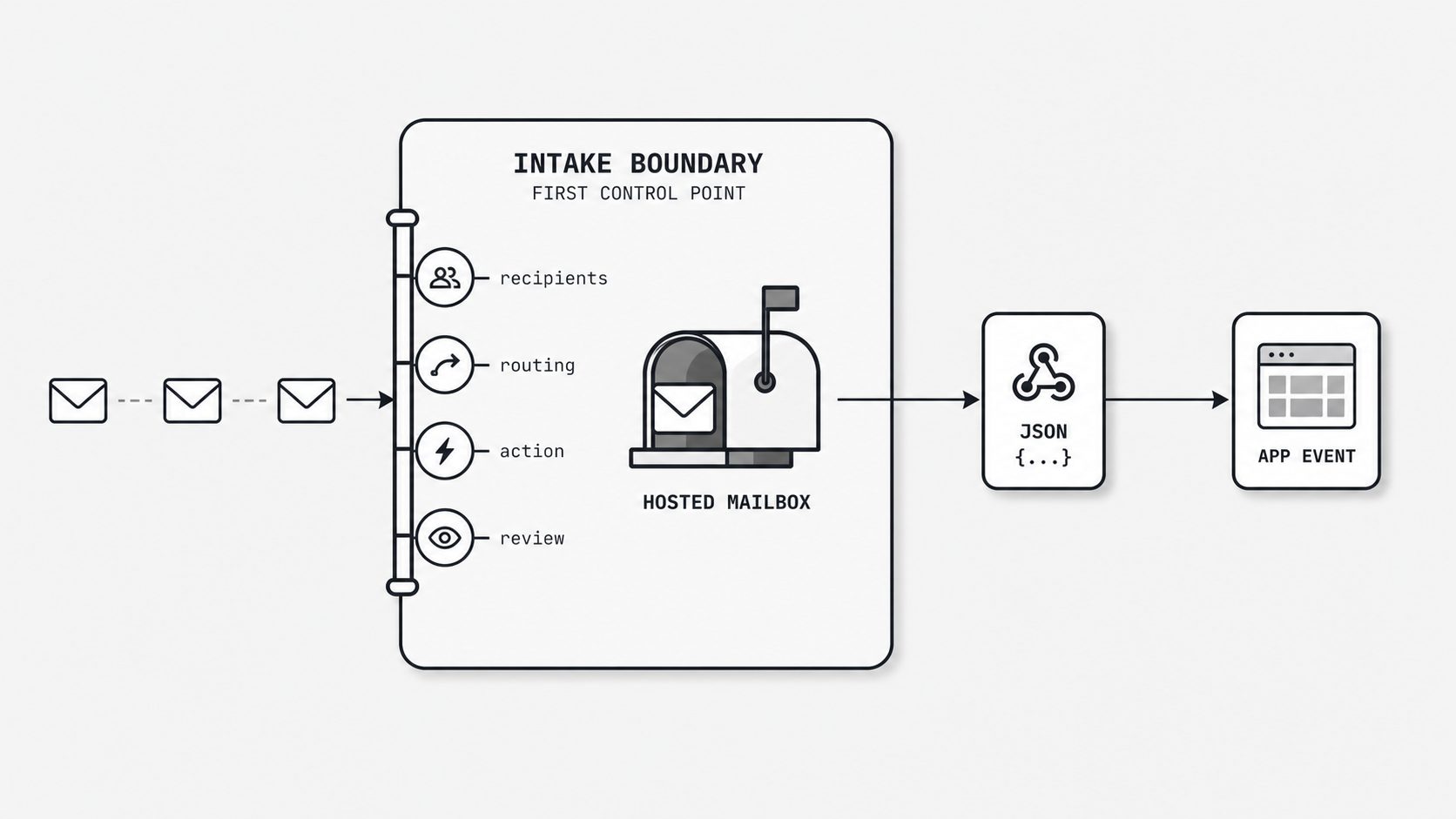
I have learned that teams trust an intake flow more when the front door is explicit. If the first real control appears only after a message lands somewhere downstream, the operating model starts with uncertainty. That matters because SMTP defines how recipients are handled during the mail transaction, including when a server can reject a recipient or refuse a message at the boundary. In plain terms, the intake point is already a control point whether we design it that way or not. (IETF Datatracker - RFC 5321 Simple Mail Transfer Protocol)
So when I talk about trust here, I am talking about something concrete. I want the address to carry policy. I want the route to reflect intent. I want review to start from a managed intake surface instead of from a mailbox someone happens to monitor that week.
Key term: Inbound governance by construction means putting acceptance rules, routing logic, and review controls at the moment email enters the system.
Here is the shift I want ops leaders to make. Stop treating governance as a cleanup step. Build it into ingress. In MailWebhook, hosted mailbox policy includes maximum message size, spam quarantine score, and spam reject score. During inbound delivery, MailWebhook enforces the size limit before storage, rejects mail at or above the spam reject threshold, marks mail at or above the quarantine threshold as quarantined, and skips webhook delivery for quarantined events until review or replay. (MailWebhook docs - Create a hosted mailbox)
AWS documents receipt rule sets for inbound mail that can evaluate recipients and then apply actions such as storing the message, invoking code, bouncing the message, or stopping further rule processing. I see that as a useful external pattern because it shows intake policy as an address-layer behavior rather than only an application behavior. (AWS Documentation - Creating Amazon SES receipt rules)
You might be wondering: what does that change in practice? It changes where certainty begins. If acceptance, routing, and escalation are defined at the intake boundary, the team can answer basic operational questions much faster. Which senders should be accepted? Which address patterns map to which workflow? Which messages should trigger an email webhook immediately, and which should be held for review first? Those decisions become part of the intake design itself instead of tribal knowledge buried in downstream scripts. (Cloudflare Docs - Email Routing)
I also think this is where a hosted email address API becomes strategically stronger. The value is that it can become a stable policy surface for operational intake when paired with predictable routing and event handling. Cloudflare documents email routing as a managed capability where administrators create custom addresses and route incoming messages to configured destinations. That reinforces the broader design idea: governance starts to feel real when the address itself is part of the control plane.
In my experience, this also reduces a common source of friction in teams moving away from inbox scraping. Many legacy flows grew up around IMAP polling because the mailbox came first and policy came later. Once ingress rules are intentional, it becomes much easier to move from brittle mailbox watching toward a cleaner inbound email webhook or other event-driven path. The team is no longer guessing what should happen after mail arrives. The intake layer already defines the first decisions.
So what does this actually look like? I look for four visible controls at ingress: accepted recipient patterns, routing behavior, action rules, and a review path for exceptions. When those are clear, downstream systems have less ambiguity to absorb. That is a better operating posture for ops leaders who want clean intake models that can scale without becoming mysterious.
The payoff is simple: trust stops being a feeling and becomes a property of the intake design. A governed front door gives teams clearer failure boundaries, cleaner routing expectations, and a more dependable handoff into automation. It also makes review easier because the first layer already reflects business intent instead of passing every decision downstream.
If I were designing this today, I would start by asking one question: what should this address allow, decide, and prove the moment a message arrives? That question usually leads to better intake architecture than starting with mailbox access alone.
The bigger point is that mailbox design is operating model design. When inbound email matters to the business, the address receiving that mail should not be an accidental byproduct of who happened to set up the workflow first. It should be intentional, managed, and aligned to how the team wants intake to work.
That is why I prefer hosted mailboxes built for operational intake. They give teams a clearer boundary between conversation and processing, better coverage through flexible addressing, and a stronger way to embed control at the edge. Instead of treating email as messy input that has to be fixed later, ops leaders can shape a front door that is reliable from the start.
If your team is moving toward cleaner intake models, this is a practical place to begin. Create an address whose job is intake. Keep ownership centralized. Absorb sender variation without multiplying mailboxes. Put policy where messages enter. Once that foundation is in place, turning email into events becomes much less fragile and much more strategic.