

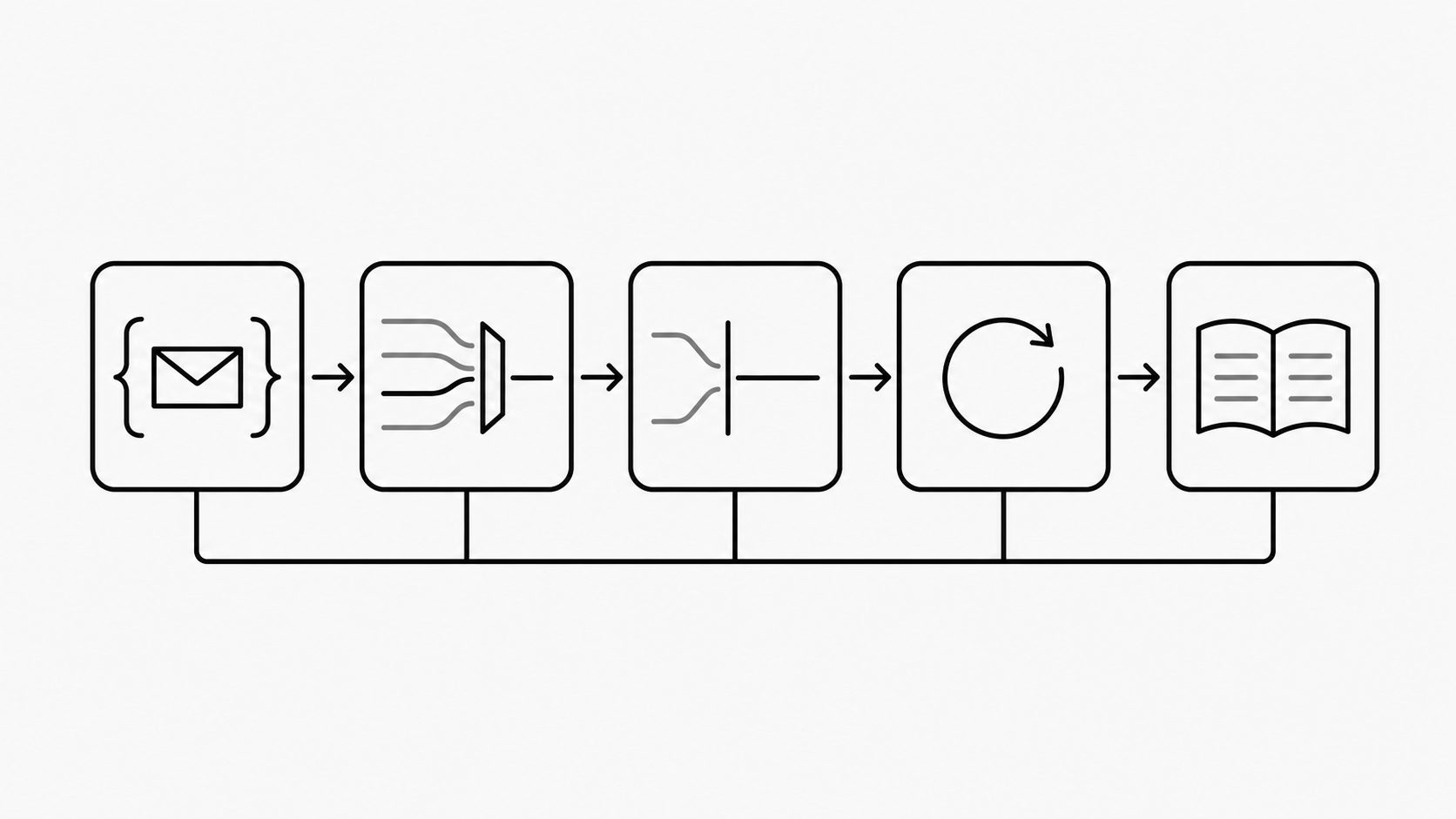
Make production approval depend on verified workflow behavior and named owners, with webhook delivery included as evidence. Feature fit is only the starting point. Daily operation also requires a traceable path from each message to a completed action or an exception with a clear owner.
I look for that evidence across five stages of email automation production readiness: test, pilot, go-live, recover, and measure. Each stage answers a distinct operational question, from whether a transformation is correct to whether continued use justifies its cost. Prove recovery and record a measurement baseline before the first live pilot; include both in the readiness plan from the start.
Start with one bounded workflow, such as turning support mail into cases. Use the example readiness record below to connect each stage’s checks to a decision about that workflow.
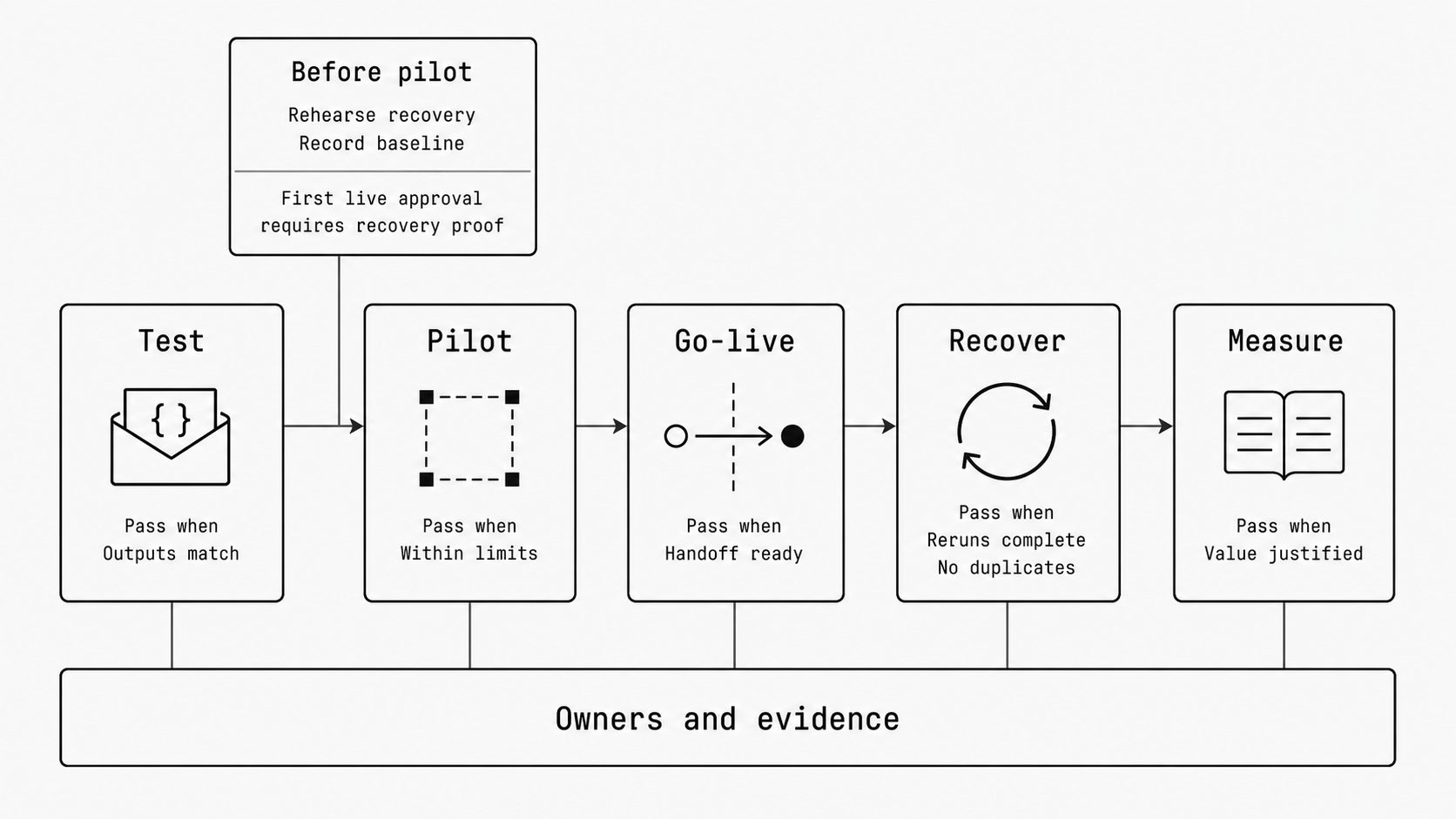
Five-stage production readiness model for email automation
Key term: The five-stage production readiness model organizes the move from evaluation to daily operation around test, pilot, go-live, recover, and measure.
Use five stages to make each readiness decision clear before expanding live email handling. I frame email automation production readiness as a series of decisions backed by evidence. Give each stage a named owner, a clear pass condition, and a record of the checks.
For a workflow that turns incoming support mail into cases through an email webhook, apply the model to that path first. Set a clear boundary around the mail it handles and the actions it may take.
Google’s SRE guidance defines a canary as a limited, time-bound release followed by evaluation. It calls for a defined group, a way to judge results, and a link between those results and the release decision. I use that principle for the pilot; the five-stage email model is my synthesis. (Canarying Releases)
Prepare all five stages before the pilot. Rehearse recovery with test messages and record how the current process performs. Use the stage order to guide the work, and make recovery proof a condition of the first live approval.
- Test: decide whether the rules produce the expected output. Preview common messages and edge cases, such as missing fields or unexpected attachments. Compare each result with an agreed example. Record the rule version and reviewed outputs. Keep customer-facing actions disabled during these checks.
- Pilot: decide whether a narrow live scope meets agreed limits. Select an inbox and a review window. Include enough varied mail to cover the intended work. Set stop conditions and name who can pause processing. Review completed work and exceptions before choosing to expand, hold, or stop.
- Go-live: decide whether the team can take over daily handling. Record when new mail changes paths, who owns work already in progress, and how older mail is handled. Test the return to the existing process. Confirm ownership of alerts and unresolved items before switching.
- Recover: decide whether failed or missed work can be completed under control. Use replay to retry selected failures and backfill to process a defined range of older mail. Check that reruns avoid duplicate cases or replies. Save the recovery results and identify anything still needing manual repair.
- Measure: decide whether continued use justifies its cost. Compare completed work, handling time, manual corrections, and operating cost with the earlier process. Include the effort spent on reviews and recovery. Name who reviews results and approves rule changes, then set the next review date.
This illustrative readiness record shows a support-mail workflow after a limited pilot. Names, evidence records, and results are fictional. Recovery was verified before the pilot; the team is now considering a wider rollout. In your own record, link each evidence entry to the saved results for the tested configuration.
| Stage | Owner | Pass condition | Evidence | Status | Next decision |
|---|---|---|---|---|---|
| Test | Maya, integration lead | Reviewed samples match expected output; tests trigger no customer-facing actions. | Sample comparison and isolated test log: passed. | Passed | Keep the tested rule version for rollout. |
| Pilot | Luis, support lead | Every pilot message is accounted for; no duplicate cases; agreed response-time limit met. | Pilot message ledger and latency report: passed within the selected inbox and review window. | Passed for pilot scope | Retain current scope until handoff is cleared. |
| Go-live | Priya, operations lead | Every open case has an accepted owner; return to the old path is tested. | Return-path drill passed; one existing case still lacks an accepted next-reply owner. | Blocked | Keep expansion on hold until both teams accept the case transfer and recheck the ledger. |
| Recover | Theo, on-call lead | Backup responder can pause processing and replay a failure without duplicate actions. | Pre-pilot alert, pause, and replay drill: passed using normal responder access. | Passed for tested scope | Repeat the drill if access or recovery settings change. |
| Measure | Erin, service owner | Handling effort improves against baseline while operating cost stays within the agreed ceiling. | Baseline and pilot cost report, including review and recovery effort: passed. | Passed for pilot window | Recheck effort and cost at the next operating review. |
The unresolved handoff blocks expansion even though the other rows pass. Keep the pilot within its approved boundary until the go-live evidence supports a new decision.
For the Measure row, consider this illustrative comparison using fictional numbers. Two weekly support-inbox samples each contain 100 messages with a similar mix of routine requests, attachments, and exceptions. Both reach the same completed-case standard within the response-time target. Manual intake takes 5 staff-hours. With automation, routine oversight and handling take 1 hour, exception review takes 1.5 hours, and recovery takes 0.5 hours: 3 staff-hours in total, saving 2 hours for comparable completed work. These figures cover recurring intake effort; one-time setup costs belong in the companion article’s detailed ROI analysis.
That result supports continuing the current pilot while operating cost stays within the agreed ceiling. Erin should target the largest remaining effort, exception review, for adjustment and measure again after any rule change. Expansion still depends on clearing the blocked handoff and confirming that the wider workload meets the same quality, response-time, and cost limits. If exception and recovery effort erase the saving, hold expansion and revise the workflow before the next review.
Set a production readiness benchmark with visible proof
Key term: A production readiness benchmark is a shared standard that lists what an email workflow must do and the evidence needed to approve it.
Set a production readiness benchmark that ties approval to saved proof for the full email webhook workflow. I look for evidence across the mail service, the receiving app, and the people who handle exceptions.
MailWebhook’s overview describes message intake, route checks, JSON transformation, and delivery to an endpoint. It documents request and response inspection, delivery attempt history, retries for temporary failures, and manual replay. New connected mailboxes start at the current mailbox position; the guide directs users to backfill for older messages. The page labels the project a work in progress. (MailWebhook Documentation)
Use those documented controls as a starting point. Treat the following checks as requirements to verify in your own setup. For each item, record what depends on the platform, receiver code, or manual work.
- Preview transformations: save a sample email, expected output, and actual output. Check the email JSON schema, which defines the required fields and their types. Record which steps the preview runs. Use a controlled test to show that it creates no live replies or record changes.
- Replay failures: save the original event ID, replay result, and settings used. Check which payload and rules the replay uses and whether it keeps the same event identity. Send the event twice in a test and verify that the receiver creates only the intended records.
- Backfill history: record the date range, available messages, and processed totals. Note age limits, access limits, and missing mail. Mark deleted or unavailable messages as gaps until a recovery source is verified.
- Quarantine noise: show where unwanted or uncertain mail is held, who reviews it, and how release works. Include messages such as auto-replies that fall outside the workflow. Trace a released message to its final result and record any manual steps.
- Report outcomes: use a webhook event inspector or saved logs to trace a message to the receiving app’s completed action. Capture the receiver’s record ID or failure reason. Keep delivered, completed, and unresolved counts separate. Record where handling-time and cost data come from.
Keep copies of the rules and relevant receiver settings beside the evidence. Test restoring them in an isolated environment. Record separate repair steps for completed actions that need correction, such as a duplicate case. Keep untested behavior marked as open. Approval stays tied to the tested scope.
Use one existing test event’s input, expected output, actual output, settings, and receiver result as the evidence behind the Test row.
Keep every message accounted for through the handoff
Key term: Transition continuity means keeping a traceable record of each message, its owner, and its outcome as handling moves from the existing process to the new automation.
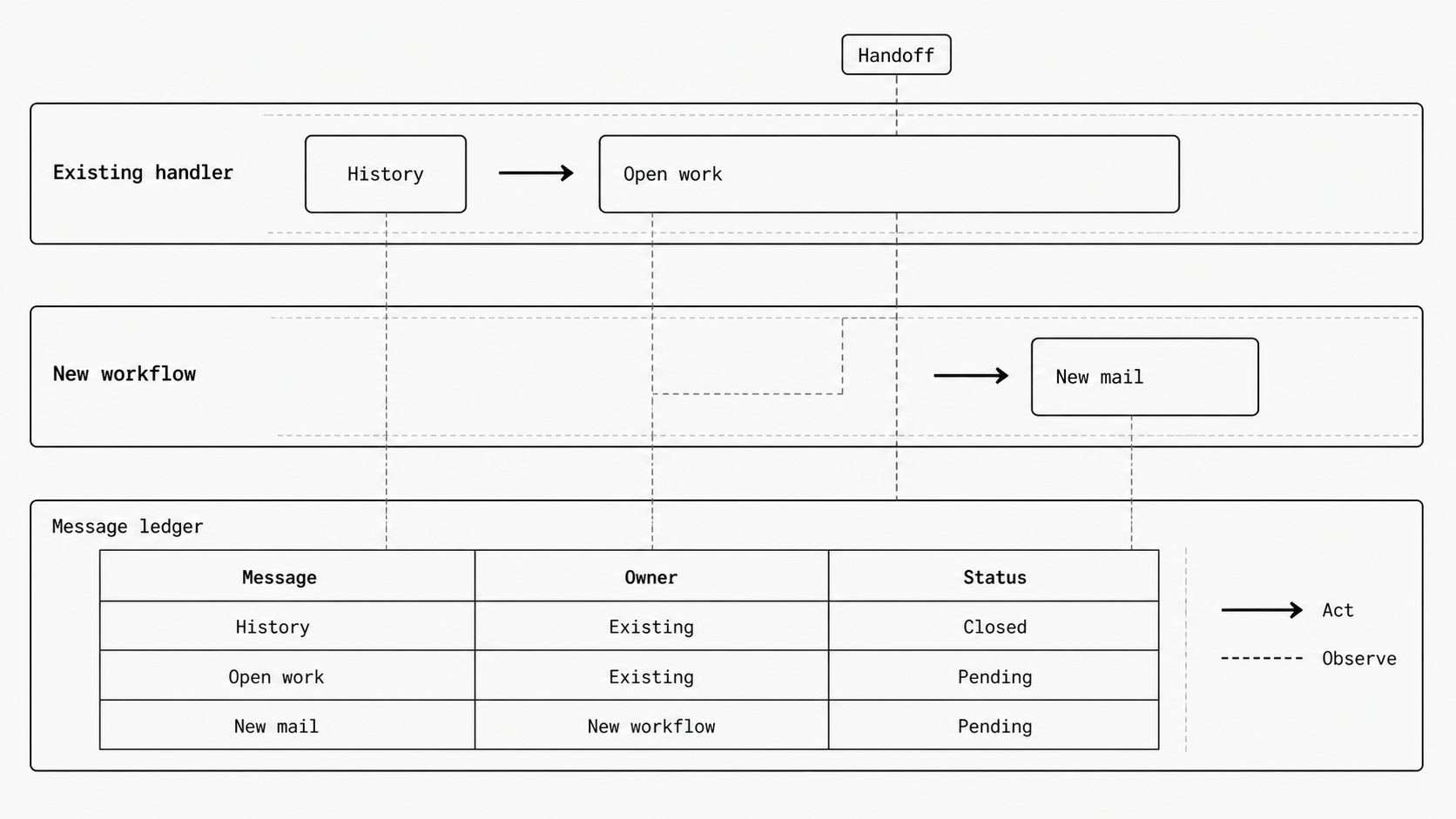
Give every message a clear owner and status before switching live handling to the new workflow. Keep that record through the handoff, including older mail and work already in progress.
For the support inbox, I frame the handoff as a transfer of responsibility. Use a shared record that covers staff actions, the old system, and the new workflow.
Build the plan around three decisions:
- Mark the boundary. Name the inboxes and folders in scope. Save the switch time and time zone, plus the mailbox position if the integration supports it. Keep a source message list spanning the switch and define who handles arrivals near that point.
- Assign work in progress. Decide whether the old path finishes each open item or passes it to the new path. Record the case ID and last completed step. Require the next owner to accept the transfer.
- Control who acts. Give one path authority to create cases or send replies for each message. Include staff and old inbox rules in this plan. Keep any comparison path read-only. Verify where new arrivals wait during a pause.
Handle older mail within the same record. Mark messages as already handled, pending review, or approved for backfill. Link existing cases and replies before approving another action. Keep unavailable history listed as an open gap.
Stripe documents that webhook endpoints can receive the same event more than once. It advises tracking processed event IDs and states that delivery order is not guaranteed. Use this provider-specific evidence to choose tests. Confirm the actual behavior of MailWebhook and the receiving app. (Receive Stripe events in your webhook endpoint)
Track source message identifiers alongside business identifiers, such as the case ID. Confirm which source identifiers stay stable across both paths and later reruns. Test a message arriving through both paths, a message already answered by staff, and related messages arriving in reverse order. Set the expected case updates and replies for each test, including valid follow-up mail.
At the end of the handoff window, match the source message list to the shared record. Give each item one current status and a link to its outcome or next action. Assign an owner and due date to each gap. Keep old records available through sign-off, and pause expansion while any message lacks an owner or known status. Apply the same ownership rules when returning work to the old path.
To clear the example’s blocked Go-live row, have both teams confirm who handles the open case’s next reply and verify that acceptance in the handoff ledger.
Operability-first rollout: proving recovery before trusting the workflow
Key term: Operability-first rollout means proving the controls needed to preview, recover, and monitor a workflow before trusting it in production.
Require a tested recovery path and named response owners before approving live email handling. Prove that an operator can detect a failure, stop affected work, and restore the intended result.
On January 31, 2017, a database incident left GitLab.com unavailable for about 18 hours. GitLab’s February 10, 2017 postmortem identified failed database backups, rejected email failure notifications, and missing ownership for regular recovery testing. (Postmortem of database outage of January 31)
I apply that recovery lesson to the people and controls behind an email workflow. Build the drill around the controls already checked in the benchmark. Use an isolated test setup, made-up messages, and blocked customer-facing actions.
Start with the support-case workflow. Simulate a receiver failure and ask the backup owner to follow the written steps using their normal access. Set the allowed recovery scope before running the drill. Review three parts of the response:
- Confirm that the test failure alerts the primary responder. Record when they acknowledge it, the response deadline, and who takes over if they miss it. Test a backup alert route outside the workflow being monitored, and confirm that it reaches the backup owner.
- Have the responder find the failed step using delivery attempt history and receiver logs. Check their access to pause affected processing and hold suspect messages for review. Name the app owner who handles failures beyond the delivery service.
- Trace the repair through to the test app’s final case state. Save the replay result, check that only the intended case changes occur, and assign any unresolved work. Name who checks the evidence and approves closing the incident.
Keep the authority to pause separate from approval to run a broad recovery. Give the responder permission to stop the affected path within agreed limits. Name who approves a larger replay, backfill, or restart. This balances a quick stop with review of actions that touch more messages.
Record each step that needs help from the workflow’s author. Update the instructions and test that step again. Also record differences between the test setup and production. Keep untested production behavior open and require proof before approving the affected scope.
Assign one workflow owner to keep the instructions, contact list, and evidence current. Repeat the relevant checks after changes to rules, receiver code, access, or alert routing.
Attach the drill results and response instructions to the Recover row, including responder access, alert deadlines, and pause and restart authority.
Keep approval tied to the evidence
Approve only the scope your evidence supports. Preview results, a controlled pilot, an accountable handoff, tested recovery, and measured outcomes together support that decision. Judge the whole workflow by its verified behavior across preview, handoff, recovery, and outcomes. Keep untested behavior and unavailable history marked as open.
At the next review, use the table’s Status and Next decision columns to resolve blocked work before expanding. After approval, keep measuring operating effort and outcomes, and reopen affected rows when the workflow changes.