

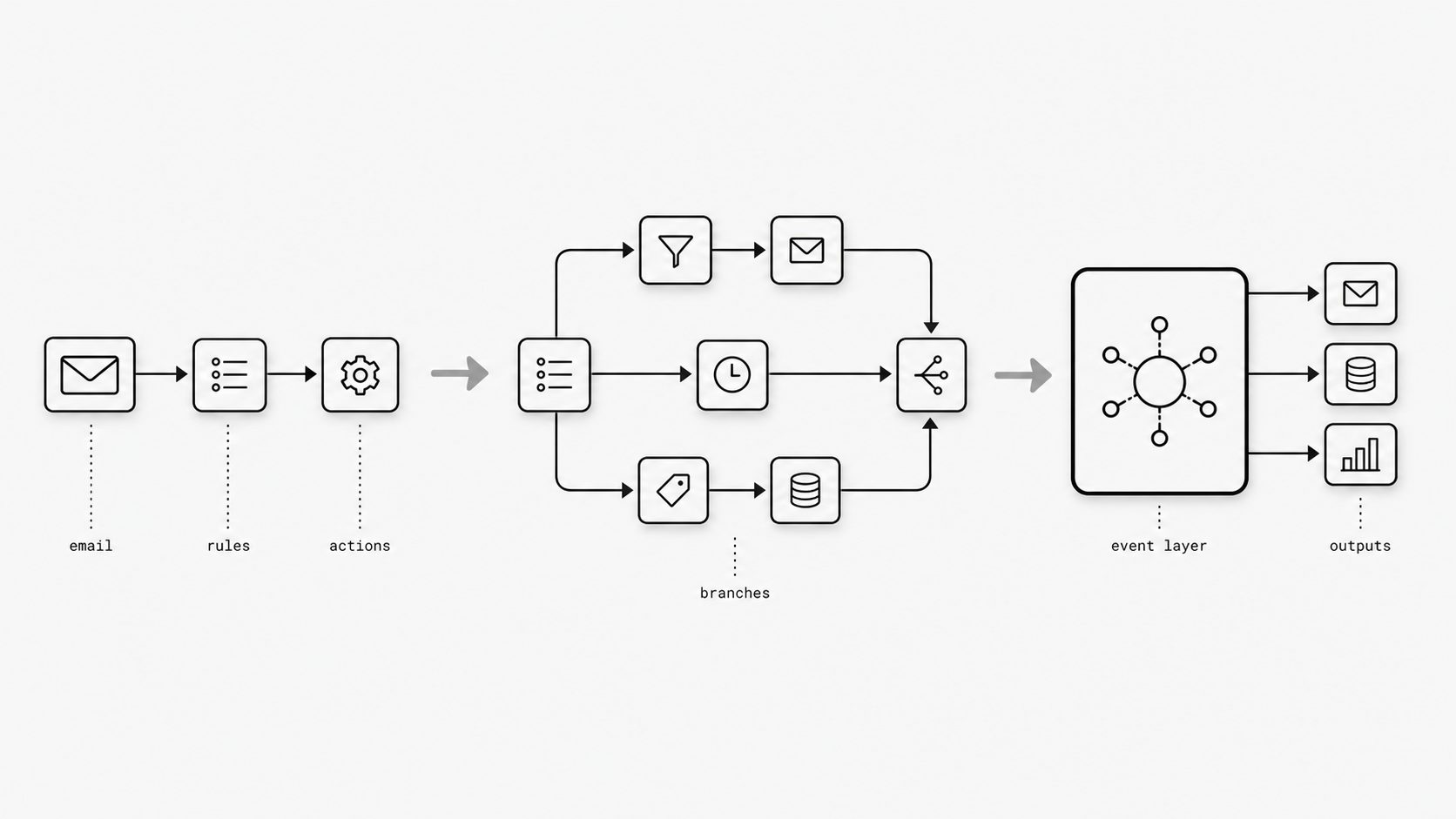
No-code automation earns its popularity honestly. For many teams, it is the fastest way to turn a messy inbox into something more structured: route messages, trigger updates, notify the right people, and remove a surprising amount of manual work without waiting on a full engineering roadmap.
That is the good news, and it is also where the confusion starts.
The same tools that make early email automation feel easy can make it harder to notice when the workflow has quietly become part of your operational backbone. What started as a helpful shortcut begins carrying customer requests, approvals, records, and revenue-linked actions. At that point, the question is no longer whether the automation works most of the time. The question is whether it is being asked to do a job it was never meant to own.
This is the line I want ops buyers and technical decision-makers to see more clearly. No-code tools are useful. They are often the right first move. But they can also become an expensive patchwork when volume rises, logic branches multiply, and reliability matters more than launch speed. In this post, I will explain where that shift happens, what signals to watch for, and how to tell the difference between convenient workflow glue and infrastructure you should actually trust.
The early win is real - and that is exactly why teams miss the ceiling
Teams love no-code email automation because the first results are often immediate: connect an inbox, add rules, route data, and save hours. That early success is real, but it can hide the point where rising volume, exceptions, and business-critical dependencies make the workflow harder to trust at scale. (IBM Think - What Is an Embedded iPaaS?)
The no-code ceiling is easy to miss because no-code tools are built to remove friction and let business teams launch useful workflows quickly without a full engineering cycle. That convenience can work well for narrow, predictable processes, but email automation rarely stays narrow for long. Routing grows into attachment handling, retention rules, retries, auditability, account matching, and exception management, turning a quick workflow into an operational system. IBM notes that low-code and no-code integration approaches can hit limits with non-standard transformations and may struggle with high-volume, real-time, or large-scale processing, which are exactly the conditions mature email workflows often reach. Gartner likewise frames iPaaS as a strategic capability, reinforcing that integration work can outgrow lightweight workflow convenience and require stronger engineering discipline. (Gartner - Critical Capabilities for Integration Platform as a Service)
The takeaway is not that the original no-code choice was a mistake. It usually means the workflow became important enough that convenience is no longer the main design goal. When an automation becomes a production dependency, the right next step is to evaluate control, observability, and support for more complex logic at scale rather than asking only whether the flow still runs.
Every extra branch feels small until the bill and the complexity arrive together
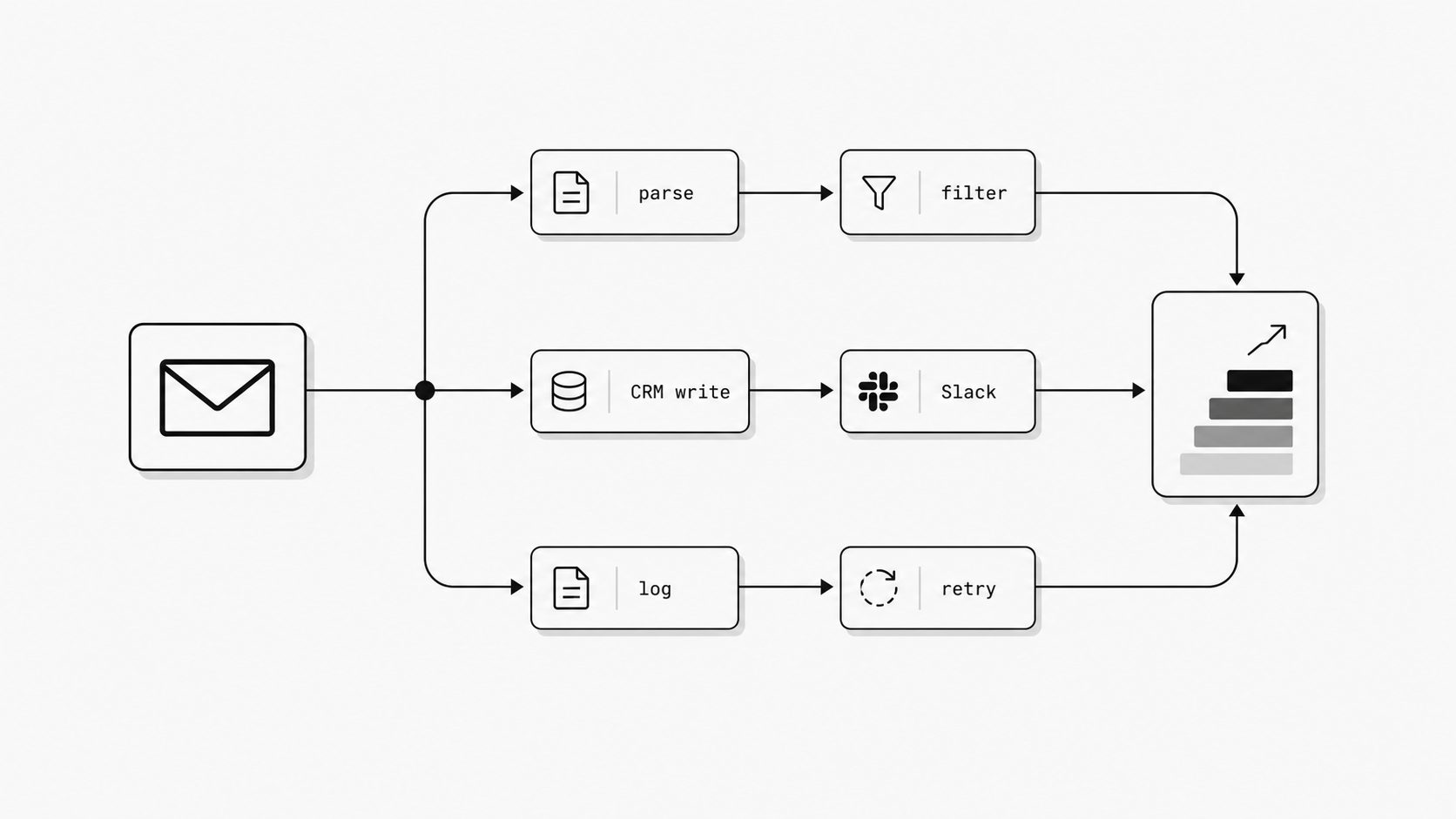
Per-step economics means each extra action in a workflow can add cost, moving parts, or both. A single inbound email may look cheap at first, but usage-based automation platforms count successful actions or operations as work, so one email can quickly turn into several billable events as logic expands with lookups, filters, branches, retries, and updates. (Zapier Help - How is task usage measured in Zapier?)
What makes this hard to notice is that the growth is gradual. Teams usually add steps for sensible reasons: safer handling, richer routing, better exceptions, and cleaner follow-up. But in tools priced around tasks or operations, that added complexity often shows up twice at once: in the monthly bill and in the operational surface area. Zapier states that a task is a successfully completed action and notes that when a plan reaches its task limit, new Zap runs can be held until the billing cycle resets, which ties workflow design directly to throughput risk. Make describes a similar pattern with operations, where bundles moving through modules can multiply usage and earlier work can increase later scenario activity. In practice, one incoming email often becomes parse, enrich, branch, write back, notify, log, and retry, which is why buyers should evaluate the cost of the full decision tree rather than the first automation alone. (Make Help - Operations)
The practical takeaway is to stop measuring email automation by how easy the first version was to launch and start measuring what one production email costs after all real-world logic is included. Ask three questions: how many actions happen for a normal email, how many more happen for an exception, and what happens operationally if usage limits are reached. If the totals keep climbing as the business gets smarter, the workflow may still function, but the economics are signaling that it is time to rethink the foundation.
The workflow works - until one connector, auth token, or format change breaks the chain
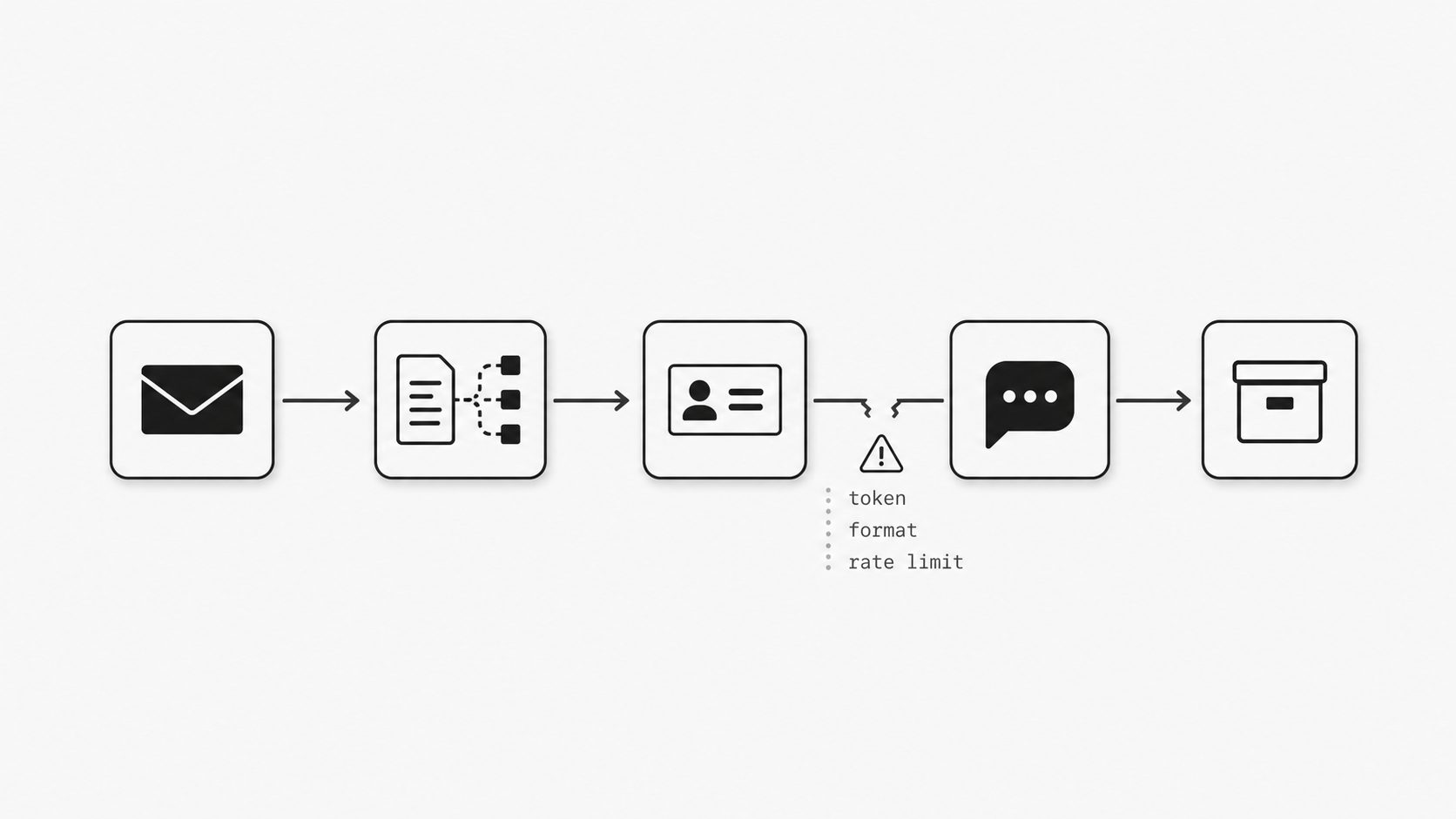
I see this pattern all the time in email automation. The workflow looks solid in the diagram. Inbox to parser, parser to CRM, CRM to Slack, Slack to ticketing, ticketing to archive. Everyone feels good because each step works on its own. Then one connector changes an API behavior, one auth token expires, or one incoming message arrives in a slightly different format, and the whole chain starts dropping data in places most teams do not watch closely enough. You might be wondering: is that really a no-code problem? I would say it is a dependency problem that no-code stacks make very easy to hide. (Zapier Help - Zap limits)
What makes this fragile is not one bad tool. It is the accumulation of assumptions across the chain. One step expects a sender field in a certain format. Another expects an attachment below a size threshold. Another depends on a third-party app staying within rate limits. Zapier explicitly documents that both platform limits and app-specific rate limits can affect execution, which means a workflow can fail even when your own logic has not changed. That matters more in email because inbound messages are messy by nature. Real senders reply from aliases, forward long threads, attach odd file types, and break the neat patterns used in the first demo workflow. (IBM Think - What Is an Embedded iPaaS?)
This is where I draw a practical line for ops buyers and technical leaders. A simple email to webhook flow can be a fast and useful convenience layer when the job is narrow and the consequences of delay are low. The risk rises when that same chain becomes the path for customer requests, approvals, orders, or compliance records. IBM notes that low-code and no-code approaches can run into performance limits in high-volume syncing, real-time pipelines, and large-scale event processing. I read that as a warning sign for teams trying to automate email workflows through a growing stack of connectors instead of treating inbound email as a production event stream with stronger control points.
In practice, connector dependency fragility usually shows up in four ways:
A field arrives empty, so downstream routing picks the wrong path. A token expires, so messages queue or fail until someone notices. An upstream app changes a payload or attachment handling rule, so parsing breaks silently. A rate limit slows one service, which creates delays across the rest of the workflow.
None of these issues are dramatic on their own. That is exactly why they are expensive. They create manual checking, hidden retries, support tickets, and trust erosion between teams. And once people stop trusting the chain, they start adding side spreadsheets, inbox rules, and human workarounds around it, which defeats the original promise of no-code speed.
The useful question is not whether connectors are good or bad. It is whether your workflow can survive when one dependency changes without warning. If the answer is no, you are no longer dealing with a lightweight helper. You are operating a fragile integration layer. That is the moment I would move the design closer to infrastructure: centralize inbound handling, reduce chained transformations, make retries and logging explicit, and give the team one place to observe failures before they spread. For technical teams building email automation for developers, that often means treating an inbound email webhook or mail webhook as a controlled entry point instead of letting every downstream app interpret the message differently. The big insight here is simple: the chain usually breaks at the seams, not at the center. If you can see and control the seams, you can decide which automations stay convenient and which ones deserve a more dependable foundation.
So what should sit at the center when email is part of core operations?
Key term: Infrastructure versus convenience line means the point where an easy workflow tool stops being enough because the email process now needs production-grade control. (Stripe Docs - Receive Stripe events in your webhook endpoint)
Here is the line I want buyers to see clearly. If email is helping with a side task, convenience can be enough. If email is opening tickets, moving money, confirming orders, triggering account changes, or feeding customer records, I want one controlled system at the center of that flow. That center should verify what arrived, decide what happens next, retry when delivery fails, and show the team exactly where an event is in its lifecycle. Those are the habits of infrastructure, and they are the habits mature event-driven systems use when failure has an operational cost.
You might be wondering: is this really where a Zapier email webhook alternative enters the picture? I think yes. The real question is rarely whether a workflow can be built. It is whether the workflow can be trusted when volume rises, exceptions pile up, and email becomes part of a business-critical path. (Zapier Help - How Zapier MCP usage works)
This is the distinction I use in practice. Convenience tools are great at helping a team move fast on bounded tasks. Infrastructure earns its place when the business needs repeatability, auditability, and operational visibility across many events. Stripe’s webhook guidance is a useful benchmark here because it reflects the controls serious event handling requires: the platform tells teams to verify webhook signatures and documents automatic retries for failed deliveries for up to three days in live mode with exponential backoff. I am not bringing that up because every email workflow should copy Stripe feature for feature. I am bringing it up because it shows what dependable event processing looks like once an input matters to the business.
Email deserves that same mindset when it becomes a production input. An inbound email webhook should not just forward a message and hope each downstream app interprets it correctly. It should create a durable event boundary where the team can normalize data, apply rules consistently, log outcomes, and manage retries in one place. That is especially important for teams exploring email automation for developers, because the operational value is not only in automating email workflows. It is in making the workflow observable and supportable after launch.
I also think the cost model tells you when you have crossed this line. Zapier’s help center explains that its task-consuming products share the same allowance model, which means growing usage draws from one common pool rather than living in a separate operational class. That is perfectly reasonable for convenience work. It becomes a strategic issue when core email processing is competing for the same consumption model as lighter automations across the business. At that point, the conversation changes from “Can we automate this?” to “What belongs on infrastructure and what should remain a helper layer?”
That is why I usually recommend a simple center of gravity: treat email intake and decision logic as infrastructure, then let convenience tools handle side effects around the edges. A team may still forward email to webhook endpoints, notify Slack, update a spreadsheet, or trigger lightweight follow-up steps. The difference is that the critical interpretation of the message happens once, under controlled rules, before all the optional downstream actions begin.
The practical reward is clarity. When email sits on the infrastructure side of the line, you get a cleaner way to decide tool roles. Use convenience tooling for quick routing, alerts, and low-risk workflow glue. Use a dependable email webhook or mail-to-webhook layer when the message itself drives business state, customer commitments, or compliance-sensitive actions. That approach reduces ambiguity for ops buyers because it ties architecture to consequence, not to personal tool preference.
If I were pressure-testing a current setup, I would ask four short questions. Can we verify the source of inbound events? Can we retry safely when delivery or downstream handling fails? Can we see message status without opening five tools? Can one team own the operational truth for this flow? If those answers are weak, the issue is no longer convenience. The issue is foundation.
That is the line I want leaders to draw. Keep no-code where speed is the main value. Put production email handling on a foundation designed for control, visibility, and reliability.
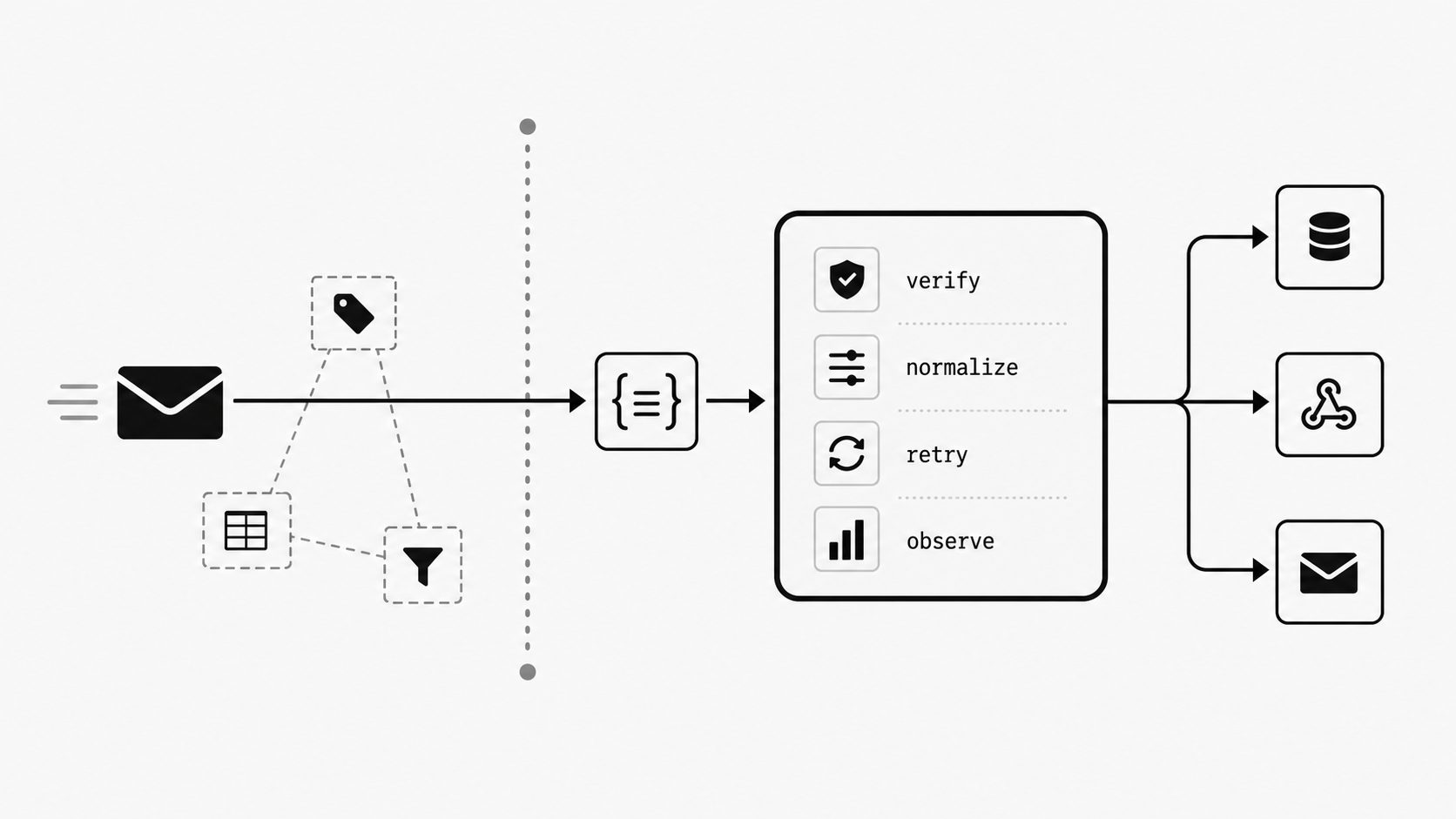
The core issue is not that no-code email automation is bad. It is that success changes the requirements. A workflow that was perfect for a narrow task can become fragile and costly once it starts handling exceptions, scaling across teams, and carrying business-critical outcomes.
That is why I think the most useful decision is not whether to keep or replace no-code wholesale. It is to draw a firmer boundary. Keep convenience tools where speed, experimentation, and lightweight coordination matter most. Move email intake, interpretation, and core decision logic onto a more controlled foundation when the process starts affecting operations in a meaningful way.
Teams that cross that boundary usually split into two clear paths: developer-owned intake and email data entry automation for managed operations work.
If your current setup is creating rising usage costs, hidden connector risk, and too many places to debug one message, you are probably not dealing with a simple workflow anymore. You are managing infrastructure through convenience software. Once you see that clearly, the next step becomes much easier: centralize what must be reliable, simplify what does not need to be central, and let your tooling match the real operational importance of the work.