

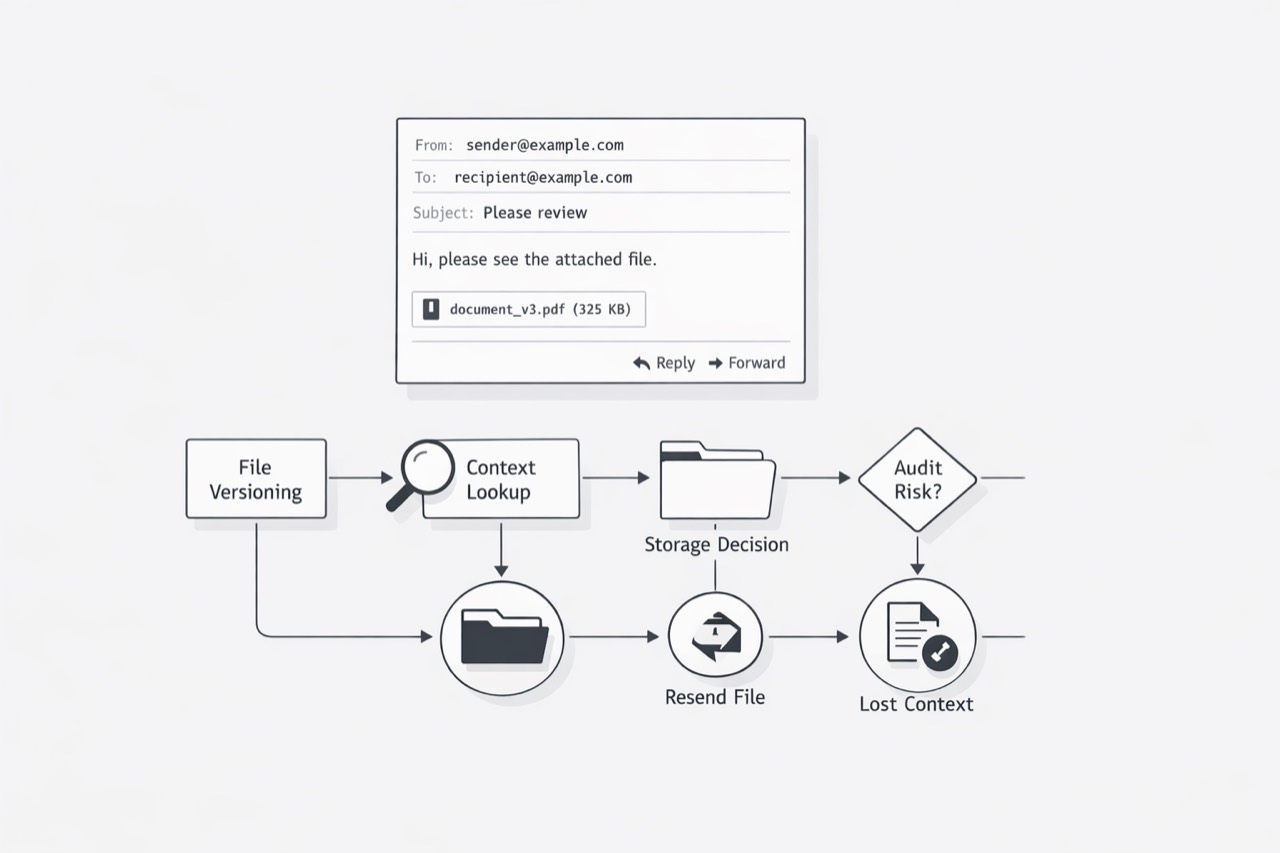
Email workflows rarely look broken at the start. Messages are arriving, people are replying, and work appears to be moving. That is exactly why attachment-heavy processes are so easy to underestimate. For ops leaders running document-heavy workflows, the visible system is the inbox, but the real operational load often sits in everything wrapped around the file: saving it, naming it, routing it, locating it again, confirming the right version, and preserving the context that made it meaningful in the first place.
I think that is why attachments so often become the first serious bottleneck. As teams process more documents, screenshots, PDFs, and forms through email every quarter, the message layer can still feel manageable while the file layer starts introducing friction at every handoff. What looks like ordinary admin work slowly turns into queue time, ambiguity, retries, and inconsistent process behavior across teams.
In this post, I want to make that pattern easier to see. I will show why attachment-heavy email workflows usually break first by creating hidden handling burden, weakening the context around business records, adding strain through large file payloads, and pushing teams to invent their own uneven document routines. Once those forces compound, email stops acting like a simple communication channel and starts acting like an operational constraint.
The work around the file becomes the real job
I usually hear the same signal before a document-heavy workflow starts to break. Nobody says, “our operating model is failing.” They say, “we are spending too much time chasing attachments.” That sounds small until you watch the day up close. A quote comes in as a PDF. Someone downloads it, renames it, saves it to a shared folder, and reattaches it to a reply. Then a second version arrives with one field changed, and the team has to stop and figure out which file is correct. The business process is still moving, but the human effort has shifted away from decision-making and toward file babysitting. That is the moment when the work around the file becomes the real job.
I think this gets dismissed because attachment work looks ordinary. It does not feel like a system problem. It feels like a few clicks. A quick save. A quick rename. A quick forward. The trouble is that document-heavy operations do this all day, across every handoff. And these workflows are operating at massive scale. Adobe says Acrobat has more than 650 million monthly active users and that people open more than 400 billion PDFs in the app each month. Adobe also says there are more than 3 trillion PDFs in circulation. Those numbers matter because they remind me that document handling is not some edge case buried in back-office work. It is a core operating pattern for modern teams. (Adobe Acrobat AI Assistant Introduces New Generative AI Features to Make Understanding Contracts Easier for Everyone)
Once that pattern lives inside email, the hidden labor grows fast. Every attachment creates a small chain of follow-on tasks: naming, storing, checking format, confirming the latest version, moving it into another system, and answering the next person who cannot find it. None of those steps are the business outcome. They are support work created by the file itself. In operations teams, that support work spreads quietly because it is easy to distribute across many people. One person saves the file. Another updates the record. Another sends it to a partner. Another rekeys data from the document into a line-of-business tool. The process can look functional from the outside while time leaks out of every inbox.
You might be wondering: is this really the first bottleneck? In my experience, yes, because attachment-heavy workflows put friction at the exact points where work changes hands. Handoffs are where speed, ownership, and accuracy already get tested. Add a file to that handoff and the team now has one more object to control. If the file naming is inconsistent, search gets harder. If the storage habit varies by person, retrieval slows down. If the next step requires re-uploading, the same document gets touched again. The workflow starts to depend on people remembering a sequence of micro-actions that lives outside the core system.
That is why this kind of burden compounds faster than leaders expect. A small handling cost repeated across high-volume document flows turns into queue time, interruptions, and avoidable rework. The team feels busy because it is busy. It just is not busy on the part that creates the most value.
The practical insight is simple: when you see teams spending more effort moving files than moving decisions forward, you are no longer looking at admin overhead. You are looking at an operating constraint. I use that as an early warning sign. If inbox-based work requires repeated download, rename, save, locate, and resend behavior, the workflow is already taxing people in ways that will be hard to scale. The file is no longer supporting the process. The process is serving the file. For ops leaders with document-heavy workflows, that shift is usually the first clear sign that email has become too much of the system.
The moment the file leaves the message, context starts to leak
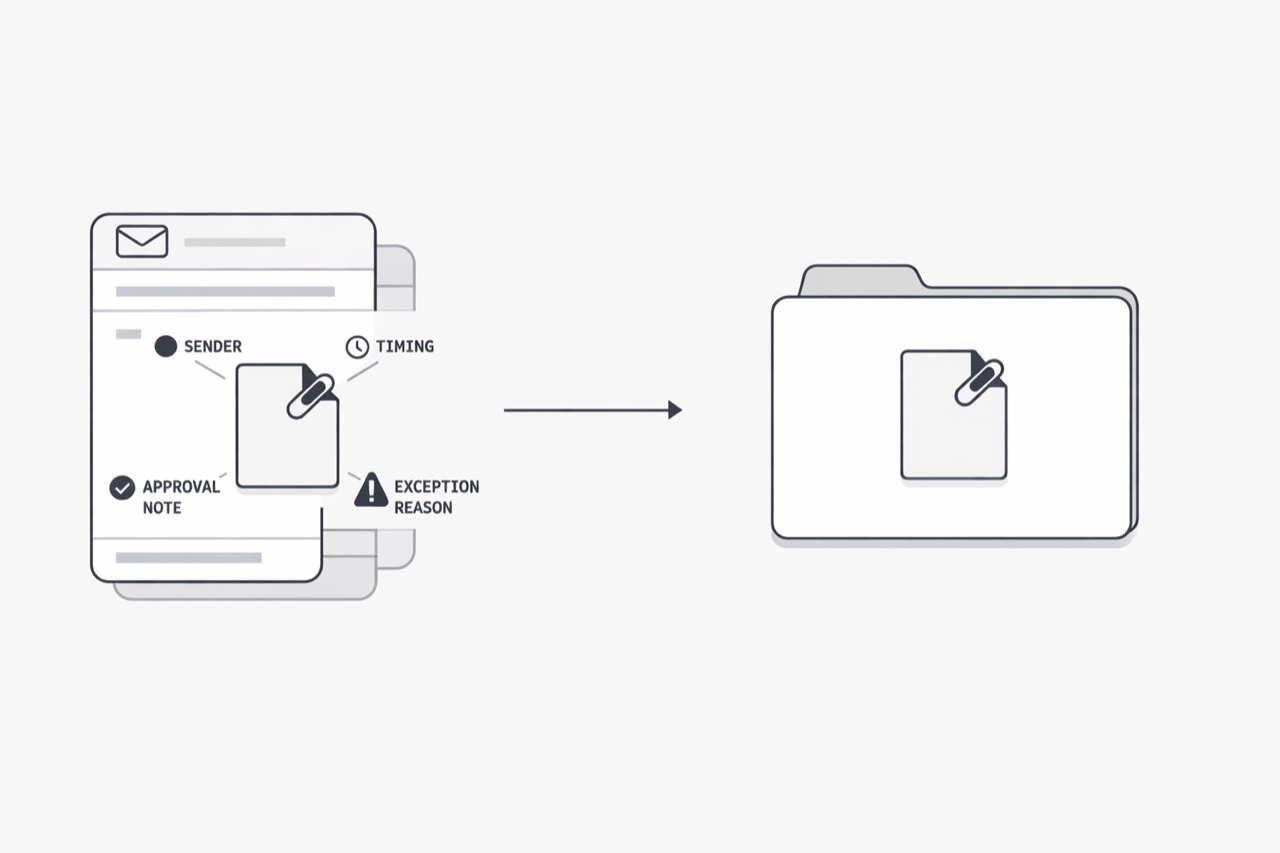
I have seen this happen in teams that look perfectly organized from the outside. The file is saved to the shared drive. The attachment is copied into the ticket. The PDF is moved into the customer folder. Everyone feels like they did the responsible thing. Then a simple question shows up: Why did this version get approved? Who asked for the change? Was this screenshot sent before or after the exception was granted? At that point, the team has the file, but it no longer has the full story around the file.
That is the part many leaders miss. A document rarely carries enough meaning by itself. Modern work stretches across PDFs, Word files, PowerPoint files, text documents, and other formats, so the business context is already spread across multiple surfaces before the file even moves. Once that file gets detached from the message flow that introduced it, the operating risk goes up fast. The document still exists. The explanation starts to thin out. (Adobe Reimagines PDFs by Integrating Adobe Firefly into Acrobat and Adding Support for Chat Across Multiple Documents in Acrobat AI Assistant)
I think of email attachments as fragile containers for business context. The attachment holds the artifact. The message around it often holds the reason, urgency, owner, decision path, and trust signal. When those two parts stay together, people can usually reconstruct what happened. When they split apart, teams start filling gaps with memory.
You might be wondering: should a good file not explain itself? In some narrow cases, yes. A finalized contract, a signed form, or a standard invoice may stand on its own well enough. Most operational documents do not live in that clean state for long. They arrive with comments, caveats, screenshots, partial data, follow-up instructions, and informal approvals. Adobe describes document work as spanning many document types, which lines up with what operations leaders already feel every day: the process is not centered on one neat file type with one neat chain of custody. It is a mixed stream of supporting material.
That is where fragility enters. The moment someone pulls the file out of the message and drops it into a folder, system record, or shared workspace, the surrounding context often stays behind. Maybe the filename gets cleaned up. Maybe the forwarding note is lost. Maybe the attachment is uploaded into a platform that stores the binary object but not the full conversation that made it understandable. A week later, another team sees the file and treats it like a complete artifact. In reality, they are looking at a partial record.
I also would not treat this as only a productivity issue. It is a trust issue. Email remains an important security surface, and human involvement in breaches stays high, according to Verizon’s 2025 DBIR summary. Verizon’s APAC summary also highlights email as a malware delivery vector. That matters here because teams are trained to read signals around an email - sender, timing, thread history, odd wording, unexpected requests - when deciding whether to trust what they received. When the file gets separated from that message layer, some of those trust cues disappear with it. (Verizon’s 2025 Data Breach Investigations Report: System intrusions behind 80% of APAC breaches)
In practice, this creates very specific operating problems that are easy to recognize:
A saved file no longer shows who provided the exception.
A screenshot loses the note that explained what to look at.
A PDF gets stored without the reply that clarified which page mattered.
A forwarded attachment reaches a new team without the original chain that explained urgency or risk.
None of that looks dramatic in isolation. Together, it makes document-heavy workflows harder to audit, slower to resolve, and easier to misunderstand.
The insight I want ops leaders to hold onto is simple: attachments do not only move files - they move context, and context is the first thing that breaks during handoffs. If your workflow depends on people keeping the explanation mentally attached after the actual message is gone, the process is already more fragile than it looks.
That changes how I evaluate document operations. I do not just ask where the file is stored. I ask whether the next person can understand the file without hunting through inboxes, asking for clarification, or guessing at intent. If the answer is no, then the workflow is carrying hidden risk even when every document appears to be present. The file survived. The meaning did not fully survive with it. That is usually the moment when email stops being a communication layer and starts becoming a source of operational ambiguity.
Big files create pressure long before anyone says the system is failing
I usually see this problem before a team names it. People say an inbox feels slow, a file would not send, or a packet had to be split across multiple emails. Those are not random annoyances; they are early signs that message-size constraints are shaping the workflow. Microsoft says internet email accounts such as Outlook.com and Gmail have a 20 MB email size limit when sending through Outlook. Microsoft also says Outlook.com has a 25 MB attachment size limit. Microsoft further notes that Exchange Online limits vary by routing path and client behavior, which can reduce what is practical to send. (Reduce attachment size to send large files with Outlook - Microsoft Support)
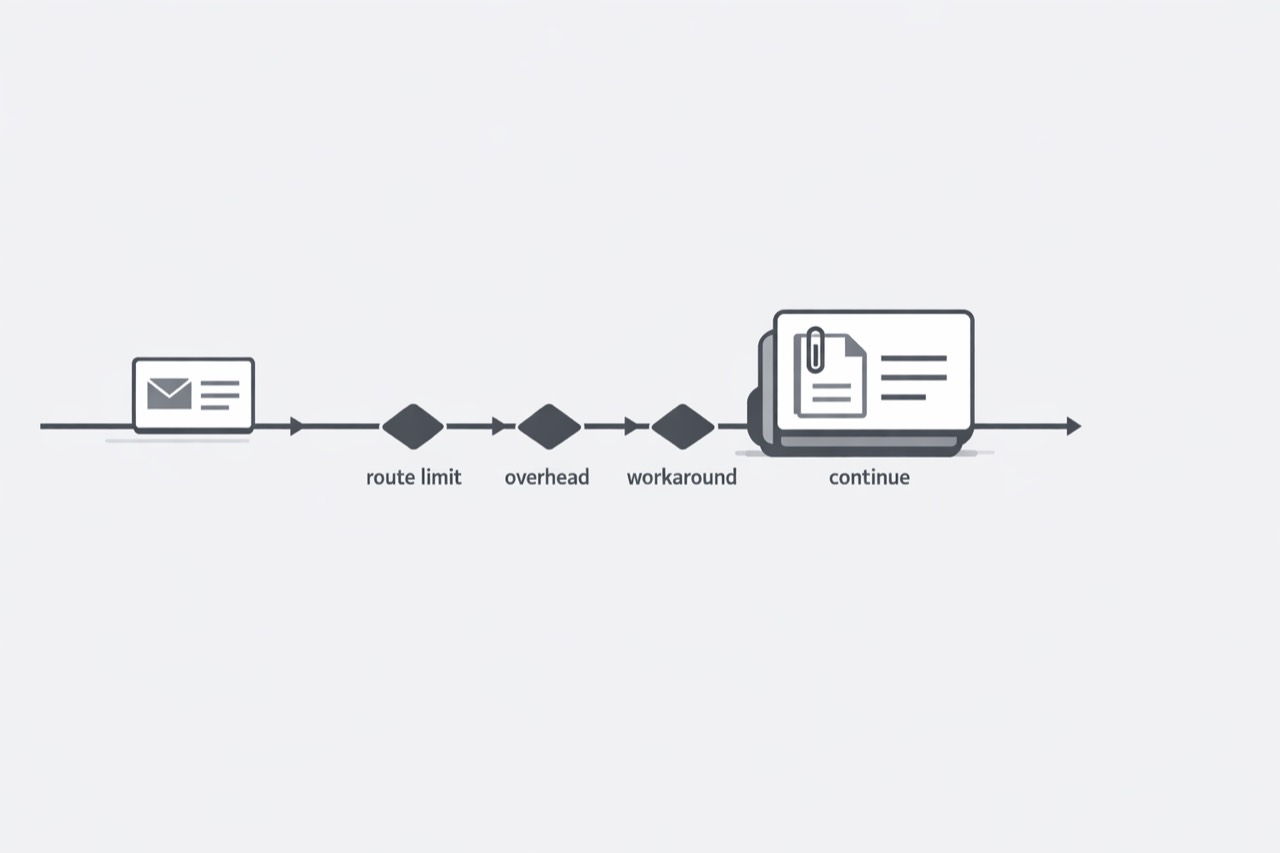
Large files do more than risk a bounce-back. They create friction around the message itself. Teams start asking whether to compress a PDF, split the file, send screenshots, upload a link, or request a lower-resolution scan instead. That means the payload is now influencing process design. Microsoft also notes that message size calculations are affected by encoding and that external routing can add about 33% overhead in Exchange Online scenarios. In practice, the file size a sender sees is not always the size the mail system must carry. This is why a file that looks acceptable can still fail or require a workaround once it moves through the mail pipeline. (Sending limits in Outlook.com - Microsoft Support)
Use size-limit workarounds as an early warning signal. If staff regularly compress files, split submissions, switch channels, or replace attachments with ad hoc links just to keep work moving, email is no longer acting as a neutral transport layer. A quick operational test is to ask: how many extra decisions or retries does this file create before work can continue? When that count rises, the workflow is already under strain from mail constraints rather than business needs. (Exchange Online limits - Service Descriptions - Microsoft Learn)
Every team builds its own attachment playbook, and that never stays small
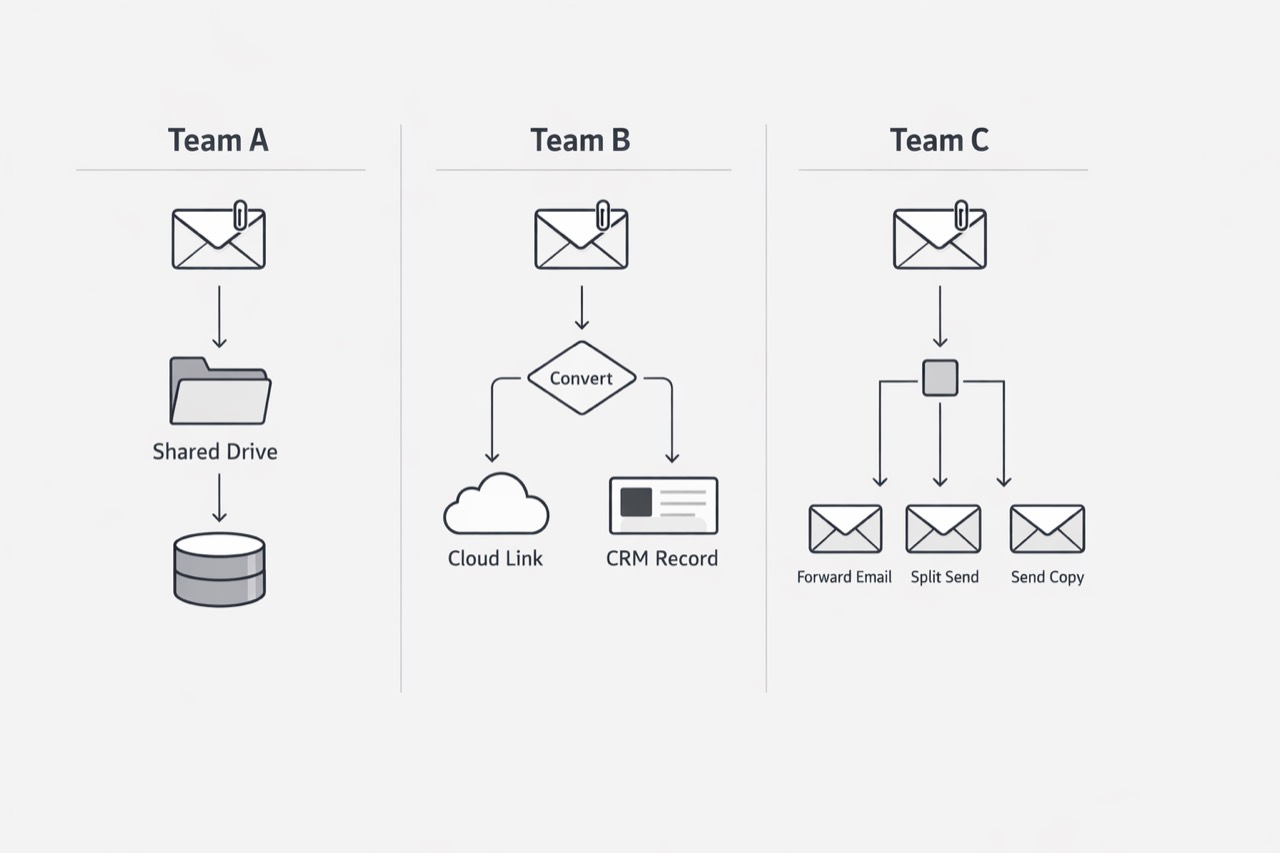
I can usually spot the next stage of breakdown when a team says, “we have a process for attachments,” and then five people describe five different processes. One team saves every file to a shared drive. Another keeps the latest copy in the CRM. Another forwards the email and leaves the attachment in the thread. Another prints the document, signs it, scans it, and sends back a new PDF. In document-heavy operations, that variation becomes a real operating problem fast. (Adobe Reimagines PDFs by Integrating Adobe Firefly into Acrobat and Adding Support for Chat Across Multiple Documents in Acrobat AI Assistant)
The issue is not that people are careless. The issue is that email gives teams enough freedom to invent workarounds without giving leaders much consistency in return. Microsoft documents that attachment and message limits vary by client and route in Exchange Online, and external routing can be reduced by encoding overhead. So teams adapt in different ways: one group compresses files, another switches to cloud links, and another splits submissions across multiple emails. Over time, those local fixes harden into process, making training harder, auditing slower, and cross-team handoffs more brittle. (Exchange Online limits - Service Descriptions)
A useful takeaway is to ask one plain question: if the same attachment reached three teams today, would it follow the same path three times? If the answer is no, inconsistency is already bigger than inbox hygiene. It means the business is relying on unofficial workflows shaped by varied document types and uneven email constraints, and that gets more expensive as volume rises. (Synthesis based on Adobe and Microsoft official documentation)
The common thread across all of this is simple: attachment-heavy workflows fail first because files create operational demands that the email itself hides. The burden shows up in the manual work required to move documents around, in the context that gets stripped away during handoffs, in the strain caused by bulky payloads, and in the inconsistent local habits teams build to keep work moving.
That is why I see attachment problems as an early signal, not a side issue. When teams spend too much time managing files, reconstructing intent, working around size limits, or translating between different attachment practices, they are no longer dealing with minor inbox inefficiencies. They are dealing with a workflow design problem that will only get more expensive as volume grows.
For ops leaders with document-heavy workflows, this is the moment to look past the email thread and examine the file lifecycle around it. If the process depends on people manually preserving order, meaning, and continuity from one attachment to the next, then the system is already more fragile than it appears. In most cases, that is the first clear sign that email has become too much of the workflow itself.
For workflows where attachments need structured metadata before downstream processing, the email to JSON page is the product owner. For teams that want document handling and entry work operated as a service, see email data entry automation.
For MailWebhook implementation details around attachment metadata and route output, use the Generic JSON, Generic JSON example, and route pipeline docs.