

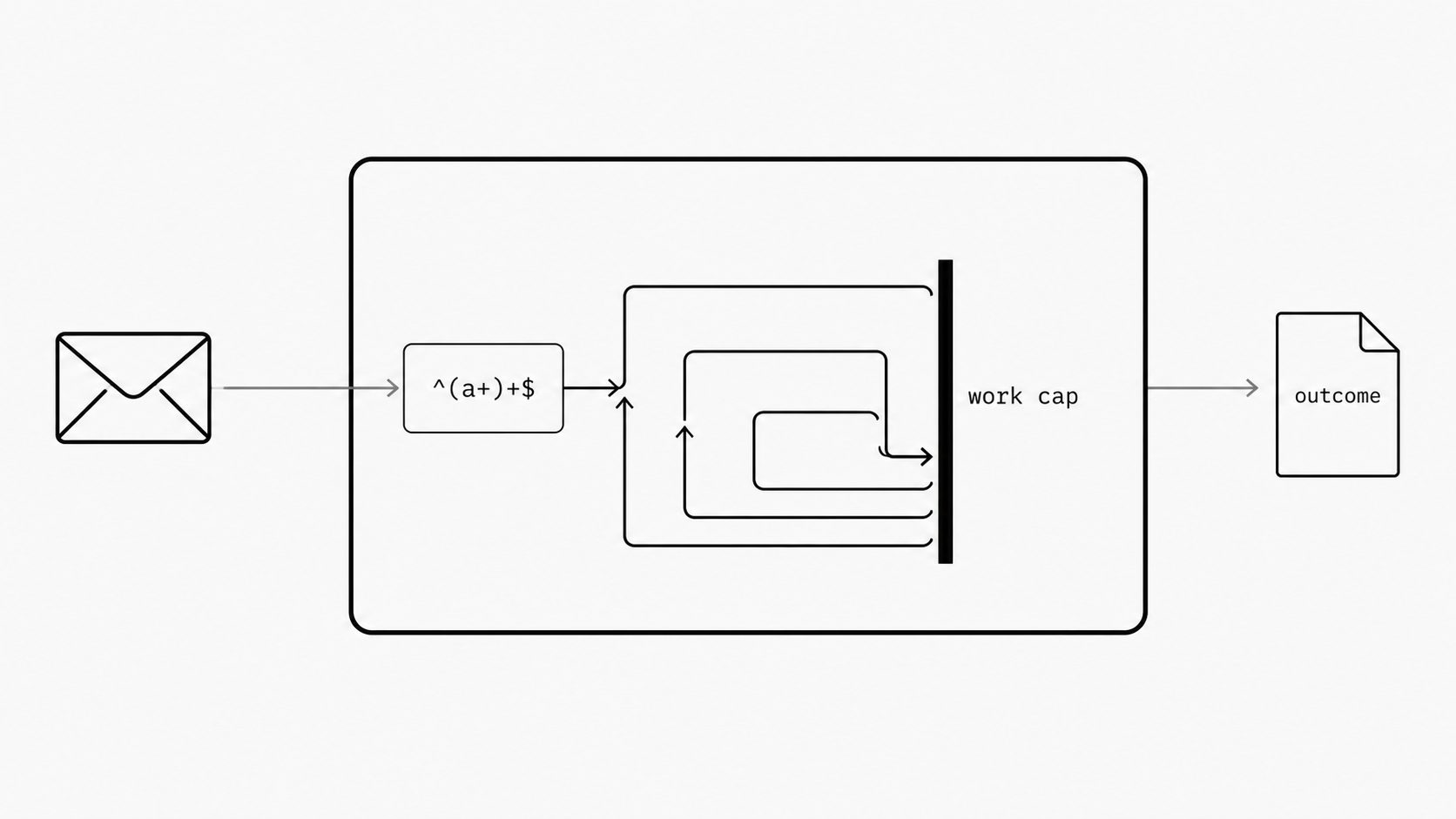
Regex catastrophic backtracking prevention starts with treating configurable email patterns as production changes that need enforced work limits and release evidence. A difficult input can make even a short routing rule consume disproportionate processing time in a backtracking engine. Base the review on the work a rule can trigger.
This post goes deeper on Question 4 from Webhook Security for Email Automation: can pattern matching stay bounded? Following Webhook Transformation Safety Limits, which covers expression budgets, this post examines the specific risk that regex patterns create within those guardrails.
A clear boundary around that work needs evidence of what happens when the boundary is reached. A lint warning identifies a concern. The warning does not set or enforce a budget. Process isolation creates a separate execution boundary. Tests must show that timed-out work stops and capacity returns.
Use the following checks to tie work limits, compatibility decisions, recovery tests, and release controls to the exact rule version going live.
Set a work limit for every email pattern
Key term: A regex, or regular expression, checks text against a pattern. Catastrophic backtracking means the matcher retries so many paths that work can grow far faster than the text.
Set an enforced work limit for every email pattern before approving it for production. Treat the text it can inspect, the work it can consume, and the outcome when it reaches that limit as part of the rule. I frame this as a service approval decision: each configurable rule needs a clear boundary.
Consider the toy pattern ^(a+)+$ against a subject such as aaaa!. In a backtracking engine, longer runs of a followed by ! can trigger costly retries before rejection. Behavior depends on the engine. Node.js documents how vulnerable regex work can block its event loop and delay other clients. Its guide advises input bounds and warns that static checks miss some vulnerable patterns.
Use Node.js as a runtime example. Confirm the engine, version, and settings used by the email platform under review. Make the work budget an explicit approval condition. Keep claims about existing controls open until implementation details and test results support them.
Build that approval around four requirements:
- Bound the text. Set a maximum length before each match runs. Name the unit, such as bytes or characters, and specify which field the rule can inspect. Decide how to handle a message that exceeds the cap.
- Enforce the budget. Record a match-time or work-step limit and the mechanism that ends execution. Require a test showing that a limit hit stops the expensive work. Set a total budget for all rules evaluated on one message.
- Test difficult failures. Ask for tests using the production engine and settings, with longer near-matches up to the input cap. Require a controlled test environment with an independent stop mechanism, and test the budget enforcement itself.
- Define the outcome. Choose what happens to a message when a rule reaches its limit. Record the rule ID, version, and reason. Give budget exhaustion its own status and assign an owner to review repeated hits.
Choose limits against the service’s response-time and capacity targets. Include representative valid messages in the test set and review the effect of rejecting or holding them. A passing test set supports the review; require a separate explanation of how the maximum work is enforced. Repeat the review when a pattern or its execution settings change.
Here is a completed illustrative review record. The rule, limits, evidence records, and decision are fictional; the values serve this example and require validation for each service.
| Review field | Completed example |
|---|---|
| Rule version | subject-route v7; pattern and engine build pinned in the release record. |
| Input cap | Decoded subject capped at 2,048 UTF-8 bytes before matching; oversized messages held for review. |
| Execution mechanism | One match per message in a separate worker process. An external supervisor enforces a 50 ms deadline, forcibly terminates overdue work, and confirms process exit before reusing the slot. Implementation review is attached. |
| Timeout outcome | Message held with status regex_timeout and the rule version recorded; automatic retries disabled. Routing tests confirm the message stays held. |
| Recovery evidence | Attached timeout and load traces show overdue workers exited and slots became available within the agreed 60 ms total budget. Memory returned to baseline and routine-message latency stayed within the service target. |
| Approval decision | Platform lead approves a staged release for the pilot mailbox only, with a named rollout owner, stop thresholds, and a tested rollback recorded. Expansion requires another review. |
If the supervisor merely returns a timeout while the matching process may continue, change the decision to hold activation: termination guarantee missing. Assign the worker owner to provide an enforceable stop mechanism and repeat the exit and capacity-recovery tests before approval. A timeout response alone leaves the work budget unproven.
Keep rule compatibility under review
Key term: Linting checks a pattern for signs of risk. A compatibility exception records approval to keep a flagged rule in use.
Allow flagged rules for compatibility only through a reviewed exception that keeps the warning visible. Each exception needs an owner, a reason, and a review date. Keep the work limits from the previous section in force.
For an email routing rules API, require accepted writes to return any warnings with a stable code and a plain-language reason. Save those warnings with the rule and show them on later reads. Apply the same review policy in the admin screen. Show both whether the rule is saved and whether approval is complete or pending.
Each exception should specify three things:
- Record the reason. Name the workflow that needs the rule and what must keep working while a replacement is prepared.
- Bind approval to a version. Record the pattern, engine version, warning, approver, and next review date. Reopen review after changes to the rule, engine, or lint check.
- Set an end condition. Name the evidence needed to renew the exception or close it. Keep each exception tied to its specific rule when reviewing new ones.
Treat a clean lint result as one input to approval. For a flagged rule, require a visible decision before activation. Explain how its owner can seek review, rewrite the pattern, or retire the rule. Preserve the warning after approval, along with the reason continued use is allowed. Keep that history when the rule changes.
An engine change also needs a compatibility review. RE2 documents matching time that grows linearly with input length for a fixed pattern. It provides configurable memory budgets, while pattern complexity affects overhead. It does not support backreferences or look-around assertions. Use that guarantee to assess matching cost, and keep separate requirements for total service response time and workload limits.
Before a move, list the features each rule uses and test its intended results. Include messages that should match, messages that should fail, and the expected route for each. For a sender-domain rule, include an unrelated domain and a similar-looking domain that should go elsewhere. Record any intended behavior change and obtain approval before rollout. Make any fallback to another engine an explicit review item.
Treat the warning fields and review steps described here as approval requirements. Ask for a sample API response and a saved rule record before marking those requirements as met. Keep unsupported answers open as evidence gaps.
At the next change review, ask for one accepted rule that still has a warning. Follow that warning from the API response to the saved record and its approval decision.
Prove expensive matches stop and release capacity
Key term: Process isolation means running a match in a separate operating-system process.
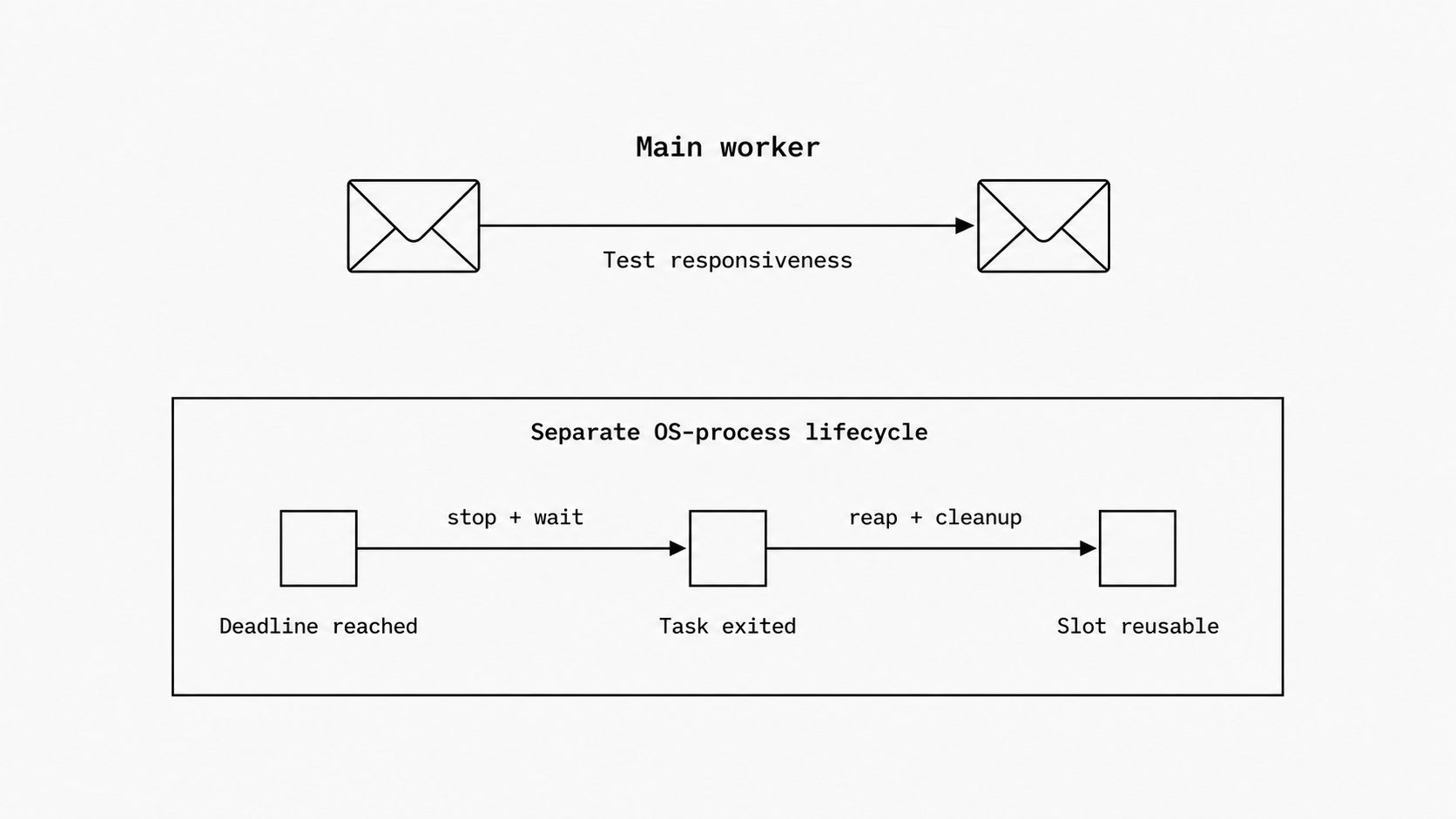
Approve separate-process execution only after tests show that expensive matches stop and the service recovers its capacity. I require evidence that the main worker stays responsive through both the timeout and the cleanup that follows.
For teams evaluating MailWebhook’s Email Webhook API, MailWebhook’s Safe Regex guide describes a separate-process path for flagged patterns or compilation failures, with a 75 ms deadline. Timeout or error returns False. Patterns that pass lint and compile run inline, within the calling process. Slow inline matches are logged and still return their result.
Use that documented behavior as the review’s starting point. Request the deployed engine and software versions, plus test results. Keep cleanup, protection across customers, and final message handling open until the evidence supports them.
Trace one expensive match through its full life:
- Set the clock boundary. Ask whether the deadline includes queue time, process startup, matching, and cleanup. Require the total delay to fit the message-processing budget.
- Show the stop. Capture when the limit fires and when the matching task exits. Confirm the parent collects the child’s exit status. Check that memory use returns within an agreed bound and the process slot becomes available again.
- Prove recovery under load. Request a controlled test with repeated expensive matches alongside routine messages. Track active processes, memory, queue depth, and routine-message delay before, during, and after the test. Set pass limits before the run. Keep an independent stop control outside the test system.
Bound both active matches and queued work for each customer and the service as a whole. Define the action when either cap is reached, including retry limits and alerts. Include process startup and replacement costs when setting the cap on simultaneous matches.
Keep the inline path in scope as well. Request evidence of enforced limits for expensive patterns that pass lint. Record any untested path as an approval gap.
Finally, trace False through the complete rule, including any condition that reverses the match result, and through the message’s final route. Require diagnostics that distinguish a normal non-match, a timeout, and an error. Record the rule ID, elapsed time, and outcome while keeping email contents out of logs. Verify the chosen hold, retry, or rejection policy in the same test.
At the next review, request one execution trace with three timestamps: deadline reached, matching task exited, and capacity restored.
Give small rule changes a full release review
Key term: A staged rollout releases a change in steps. A rollback restores a prior version.
Give every production rule change a full release review, even when the edit touches one field. Set the review depth by the traffic and shared systems the rule can affect.
On July 2, 2019, one firewall rule caused a 27-minute Cloudflare outage. Excessive regex backtracking exhausted CPU capacity, and a global release without staged rollout left no opportunity to catch the problem in a smaller release before it spread.
I judge release readiness by the evidence tied to the change. For an email routing rules API, require a release record that ties approval and test results to the exact rule version being activated.
Build these checks into the release:
- Save the change. Keep the old and new rule versions, the reason for the edit, the approver, and the activation time. Attach resource-use test results for that version.
- Limit the first release. Name the traffic that receives the change first and the evidence needed to expand it. Record which shared workers serve that traffic. Set stop thresholds for delays, errors, and processor use before release.
- Assign control. Name the person who watches the release and can pause it. Give that person authority to stop expansion when a threshold is crossed. Confirm access to the release controls during a service failure.
- Test the rollback. Record the restore action, the time it takes, and proof that live workers use the prior version. Test access to that control while message processing is under load.
Keep the review lean by collecting evidence automatically. Use the same release record format for changes made through the API and the admin screen. Send missing or failed checks to a named approver. For an urgent change, record why it needs the fast path, who approves it, and when the follow-up review occurs. Keep the stop and restore controls in place.
Use this checklist in the approval record for each rule change. Mark each item as verified, planned, or missing, and link the supporting records and test results:
- Version and scope: Record the exact rule and engine versions, execution path, and traffic covered by the review.
- Work limits: Confirm the input cap, enforced match and per-message budgets, and tested limit-hit action.
- Compatibility: Record warning decisions and any exception’s reason, owner, and review date. Keep work limits enforced for approved exceptions.
- Recovery: Attach evidence that expensive matches stop, capacity returns under load, and messages follow the chosen hold, retry, or rejection policy.
- Release controls: Attach rule-version history, staged-release settings, stop thresholds, the rollout owner’s name, and a completed rollback test.
- Approval decision: Assign an owner to each evidence gap. Hold activation until all required items are verified, and record the approver and approved scope. Require a new decision before expanding that scope.