

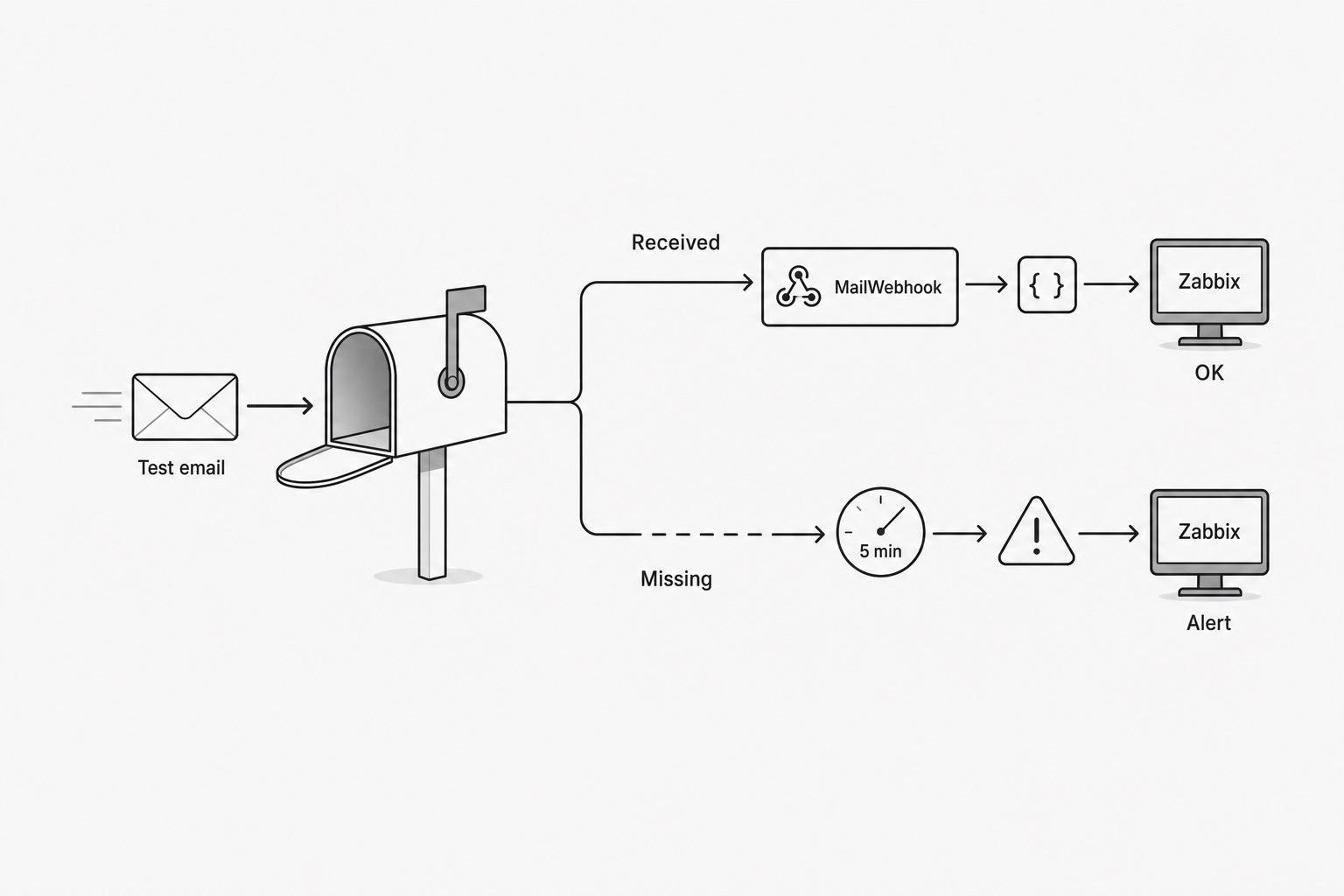
SMTP checks can tell you whether a server appears healthy. They do not always tell you whether a real message made it through the path your users depend on.
This recipe uses MailWebhook as the arrival detector and Zabbix as the monitoring system. The goal is simple: send a tagged canary email, report success only when that email arrives, and let Zabbix alert when the success heartbeat goes missing.
Pattern
flowchart LR
  Cron["Cron canary sender"] --> Sender["External sender"]
  Sender --> Mailbox["Mailbox under test"]
  Mailbox --> MailWebhook["MailWebhook watches mailbox"]
  MailWebhook --> Zabbix["Zabbix history.push() OK heartbeat"]
  Zabbix --> Trigger{"OK heartbeat missing?"}
  Trigger -- "No" --> Healthy["No alert"]
  Trigger -- "Yes, threshold exceeded" --> Alert["Zabbix alert"]
When the canary arrives, MailWebhook calls Zabbix history.push(). Zabbix alerts only if no OK heartbeat arrives within the expected window.
The key idea is to alert on missing success, not on every possible delivery failure.
Canary tagging
Do not send a generic test email. Send a tagged canary:
Subject: MW-CANARY v=1 env=prod mailbox=mx1-prod sender=postmark id=<uuid> ts=<utc>
Each tag has a job:
MW-CANARY      route this email as a canary
env            avoid mixing prod/staging
mailbox        map the OK to the right Zabbix item
sender         identify the external sender path
id             correlate sent vs received canary
ts             keep sent time for troubleshooting or future latency checks
For the first version, Zabbix only needs the OK heartbeat. This canary:
MW-CANARY v=1 env=prod mailbox=mx1-prod sender=postmark id=7f3a9c ts=2026-05-18T12:00:00Z
maps to this Zabbix item key:
mail.canary.ok[prod,mx1-prod]
Zabbix setup
Create a host:
Host: mail-deliverability
Create one Zabbix trapper item per mailbox path:
Name: Canary OK: prod mx1-prod
Key: mail.canary.ok[prod,mx1-prod]
Type: Zabbix trapper
Type of information: Numeric unsigned
Then add a trigger expression using nodata():
nodata(/mail-deliverability/mail.canary.ok[prod,mx1-prod],10m)=1
Example tuning:
Send interval: 1 minute
Warning: nodata(...,5m)=1
Critical: nodata(...,10m)=1
For noisier paths:
Send interval: 5 minutes
Warning: nodata(...,15m)=1
Critical: nodata(...,30m)=1
This avoids flapping because one delayed email does not immediately create an incident. Zabbix only alerts when the OK heartbeat has been missing for longer than the threshold.
MailWebhook endpoint
Create a MailWebhook endpoint pointing to the Zabbix JSON-RPC API:
https://zabbix.example.com/zabbix/api_jsonrpc.php
Add a custom header:
Authorization: Bearer <ZABBIX_API_TOKEN>
MailWebhook also sends its normal delivery headers with the JSON-RPC body:
Content-Type: application/json
X-Idempotency-Key: <sha256(message_id|route_id)>
X-MailWebhook-Signature: t=<unix>, kid=<kid>, v1=<base64(hmac_sha256(t+"."+body, secret))>
Idempotency-Key: <same delivery key, when this compatibility header is present>
Zabbix can ignore those delivery headers when MailWebhook calls the API directly. The important header for direct Zabbix delivery is still Authorization, because Zabbix uses that token to accept the history.push() API call.
MailWebhook route
Use MailWebhook route rules to match only canary emails:
{
  "to_emails": ["deliverability-check@example.com"],
  "from_domains": ["your-canary-sender.example"],
  "subject_regex": [
    "^.*\\bMW-CANARY\\b.*\\benv=[A-Za-z0-9_-]+\\b.*\\bmailbox=[A-Za-z0-9_-]+\\b.*$"
  ]
}
MailWebhook custom JSON payload
Use map.custom_json to emit the Zabbix history.push() request. The expressions below use the MailWebhook JsonLogic-style DSL for regex.replace and cat.
{
  "pipeline": {
    "steps": [
      {
        "name": "map.custom_json",
        "args": {
          "version": "v1",
          "vars": [
            {
              "name": "env",
              "expr": {
                "regex.replace": {
                  "value": { "var": "message.subject" },
                  "pattern": "^.*\\benv=([A-Za-z0-9_-]+)\\b.*$",
                  "with": "\\1"
                }
              }
            },
            {
              "name": "mailbox_id",
              "expr": {
                "regex.replace": {
                  "value": { "var": "message.subject" },
                  "pattern": "^.*\\bmailbox=([A-Za-z0-9_-]+)\\b.*$",
                  "with": "\\1"
                }
              }
            },
            {
              "name": "zabbix_key",
              "expr": {
                "cat": [
                  "mail.canary.ok[",
                  { "var": "vars.env" },
                  ",",
                  { "var": "vars.mailbox_id" },
                  "]"
                ]
              }
            }
          ],
          "output": {
            "jsonrpc": "2.0",
            "method": "history.push",
            "params": [
              {
                "host": "mail-deliverability",
                "key": { "var": "vars.zabbix_key" },
                "value": 1
              }
            ],
            "id": 1
          }
        }
      }
    ]
  }
}
For the example subject above, MailWebhook sends this to Zabbix:
{
  "jsonrpc": "2.0",
  "method": "history.push",
  "params": [
    {
      "host": "mail-deliverability",
      "key": "mail.canary.ok[prod,mx1-prod]",
      "value": 1
    }
  ],
  "id": 1
}
Canary sender
Here is a minimal cron sender:
#!/usr/bin/env bash
set -euo pipefail

ENV="prod"
MAILBOX_ID="mx1-prod"
SENDER_ID="postmark"
TO="deliverability-check@example.com"
FROM="canary@your-canary-sender.example"

CANARY_ID="$(uuidgen)"
TS="$(date -u +%Y-%m-%dT%H:%M:%SZ)"

SUBJECT="MW-CANARY v=1 env=${ENV} mailbox=${MAILBOX_ID} sender=${SENDER_ID} id=${CANARY_ID} ts=${TS}"

sleep "$(( RANDOM % 20 ))"

printf 'deliverability canary\n' | mail \
  -s "$SUBJECT" \
  -r "$FROM" \
  "$TO"
Cron:
* * * * * /opt/mail-canary/send-canary.sh
The jitter prevents all checks from landing at the exact same second.
Operational notes
Start simple:
flowchart TD
  Base["mail.canary.ok[prod,mx1-prod]"] --> Item["One Zabbix trapper item"]
  Item --> Trigger["One nodata trigger"]
  Base -. "add sender dimension only when needed" .-> Postmark["mail.canary.ok[prod,mx1-prod,postmark]"]
  Base -. "add sender dimension only when needed" .-> Ses["mail.canary.ok[prod,mx1-prod,ses]"]
Multi-sender checks are useful when you need to distinguish mailbox-path failures from sender-path failures.
For teams building a receiver around canary or monitoring traffic, email webhook API is the commercial owner for endpoint-side setup. For a broader rollout, use the mailbox-to-webhook overview.
One caveat: direct delivery to Zabbix is the simplest implementation, and Zabbix will authenticate the API request with the Authorization header shown above. It will ignore MailWebhook’s delivery signature because Zabbix does not validate that header. For stricter security, put a tiny gateway in front: verify X-MailWebhook-Signature against the raw JSON-RPC body, optionally validate a canary token, use X-Idempotency-Key for duplicate safety if needed, then forward history.push() to Zabbix.